# as usual, we will use the tidyverse
library(tidyverse)

# responses concerning personal activity
atus_act = read_csv('http://euclid.nmu.edu/~joshthom/dat309/data/ATUS/atusact_2025.dat')

# responses concerning demographics
atus_rost = read_csv('http://euclid.nmu.edu/~joshthom/dat309/data/ATUS/atusrost_2025.dat')

# responses concerning types of jobs
atus_job = read_csv('http://euclid.nmu.edu/~joshthom/dat309/data/ATUS/atusresp_2025.dat')Exploring a real dataset
Exploratory Data Analysis
This set of exercises exposes you to several important aspects of data science.
- This is a big dataset (relatively speaking)
- It’s been touched by many hanatus_rost, and the artifacts show.
- It involves download, import as well as installing tools specific for this dataset.
ATUS Data
Learn more and extract different data below: American Time Use Survey
How to use ATUS microdata: ATUS Microdata
Our ATUS data concerns sex, age, race, stress & work
Other interesting variables: - TRTALONE: Time spent alone - TUFINGLWGT: statistical weight for generating estimates representative of the U.S. civilian, noninstitutional population. This is a very important variable for generating estimates from the data. See ATUS Microdata for more information.
Data Dictionary
Download the Data
:w
Make a new folder inside your data309 folder called ATUS. Open the ATUS folder in Positron.
Exploratory Questions
- What is the size of the data? How many rows & columns? (Use
dim(), for dimension.) - What do the numbers mean in the rows?
- What are the variable names and what do they mean?
The (very useful) clean_names() function makes the variable names a bit easier to read. It will make the variable names all lower case, and replace spaces with underscores. It also removes special characters. The janitor package has this function.
clean_names() function
# filter to get stress data
#| eval: TRUE
library(janitor)
atus_rost <- clean_names(atus_rost)
atus_job <- clean_names(atus_job)
atus_act <- clean_names(atus_act)
unique()
We know the tucaseid variable is the unique identifier for each person in the data. How many people are in the data? How many unique caseiatus_rost are there? There are several ways to answer this.
unique_iatus_rost <- unique(atus_rost$tucaseid)
length(unique_iatus_rost)
[1] 6146# or alternatively
atus_rost |> distinct(tucaseid) |>
nrow()[1] 6146# or
atus_rost$tucaseid |> unique() |>
length()[1] 6146We can also rename variables to make them easier to read. The rename() function is useful for this.
# rename work variable
#| eval: FALSE
atus_rost <- rename(atus_rost,"sex" = tesex)
atus_rost <- rename(atus_rost,"age" = teage)
Filter
From the simplified codebook we can see that the job variable is TRDTOCC1. The detailed codebook has a list of jobs and their corresponding numbers. We can filter the data to just a few jobs to make it easier to visualize.
For the TRDTOCC1 variable, the following numbers correspond to the following jobs:
- 1 Management occupations
- 2 Business and financial operations occupations
- 3 Computer and mathematical occupations
- 4 Architecture and engineering occupations
- 5 Life, physical, and social science occupations
- 6 Community and social service occupations
- 7 Legal occupations
- 8 Educational instruction and library occupations
- 9 Arts, design, entertainment, sports, and media occupations
- 10 Healthcare practitioner and technical occupations
- 11 Healthcare support occupations
- 12 Protective service occupations
- 13 Food preparation and serving related occupations
- 14 Building and grounatus_rost cleaning and maintenance occupations
- 15 Personal care and service occupations
- 16 Sales and related occupations
- 17 Office and administrative support occupations
- 18 Farming, fishing, and forestry occupations
- 19 Construction and extraction occupations
- 20 Installation, maintenance, and repair occupations
- 21 Production occupations
- 22 Transportation and material moving occupations
# get variable names
atus_job |> names()
[1] "tucaseid" "tulineno" "tuyear" "tumonth" "teabsrsn"
[6] "teern" "teernh1o" "teernh2" "teernhro" "teernhry"
[11] "teernper" "teernrt" "teernuot" "teernwkp" "tehrftpt"
[16] "tehrusl1" "tehrusl2" "tehruslt" "teio1cow" "teio1icd"
[21] "teio1ocd" "telayavl" "telaylk" "telfs" "telkavl"
[26] "telkm1" "temjot" "teret1" "teschenr" "teschft"
[31] "teschlvl" "tespempnot" "tespuhrs" "trchildnum" "trdpftpt"
[36] "trdtind1" "trdtocc1" "trernhly" "trernupd" "trernwa"
[41] "trhernal" "trhhchild" "trholiday" "trimind1" "trmjind1"
[46] "trmjocc1" "trmjocgr" "trnhhchild" "trnumhou" "trohhchild"
[51] "trspftpt" "trsppres" "trtalone" "trtalone_wk" "trtcc"
[56] "trtccc" "trtccc_wk" "trtcctot" "trtchild" "trtcoc"
[61] "trtec" "trtfamily" "trtfriend" "trthh" "trthhfamily"
[66] "trtnochild" "trtnohh" "trto" "trtohh" "trtohhchild"
[71] "trtonhh" "trtonhhchild" "trtsponly" "trtspouse" "trtunmpart"
[76] "trwernal" "tryhhchild" "tthr" "ttot" "ttwk"
[81] "tuabsot" "tubus" "tubus1" "tubus2ot" "tubusl1"
[86] "tubusl2" "tubusl3" "tubusl4" "tucc2" "tucc4"
[91] "tucc5b_ck" "tucc5_ck" "tucc9" "tudiarydate" "tudiaryday"
[96] "tudis" "tudis1" "tudis2" "tuecytd" "tuelder"
[101] "tuelfreq" "tuelnum" "tuern2" "tuernh1c" "tufinlwgt"
[106] "tufwk" "tuio1mfg" "tuiodp1" "tuiodp2" "tuiodp3"
[111] "tulay" "tulay6m" "tulayavr" "tulaydt" "tulk"
[116] "tulkavr" "tulkdk1" "tulkdk2" "tulkdk3" "tulkdk4"
[121] "tulkdk5" "tulkdk6" "tulkm2" "tulkm3" "tulkm4"
[126] "tulkm5" "tulkm6" "tulkps1" "tulkps2" "tulkps3"
[131] "tulkps4" "tulkps5" "tulkps6" "turetot" "tuspabs"
[136] "tuspusft" "tuspwk" "txabsrsn" "txern" "txernh1o"
[141] "txernh2" "txernhro" "txernhry" "txernper" "txernrt"
[146] "txernuot" "txernwkp" "txhrftpt" "txhrusl1" "txhrusl2"
[151] "txhruslt" "txio1cow" "txio1icd" "txio1ocd" "txlayavl"
[156] "txlaylk" "txlfs" "txlkavl" "txlkm1" "txmjot"
[161] "txret1" "txschenr" "txschft" "txschlvl" "txspempnot"
[166] "txspuhrs" "txtcc" "txtcctot" "txtcoc" "txthh"
[171] "txtnohh" "txto" "txtohh" "txtonhh" "trlvmodr" atus_job <- atus_job |> rename("job" = trdtocc1)
# notice the syntax below (==) signs for boolean (yes/no) comparisons. The `|` symbol means "or" in this context.
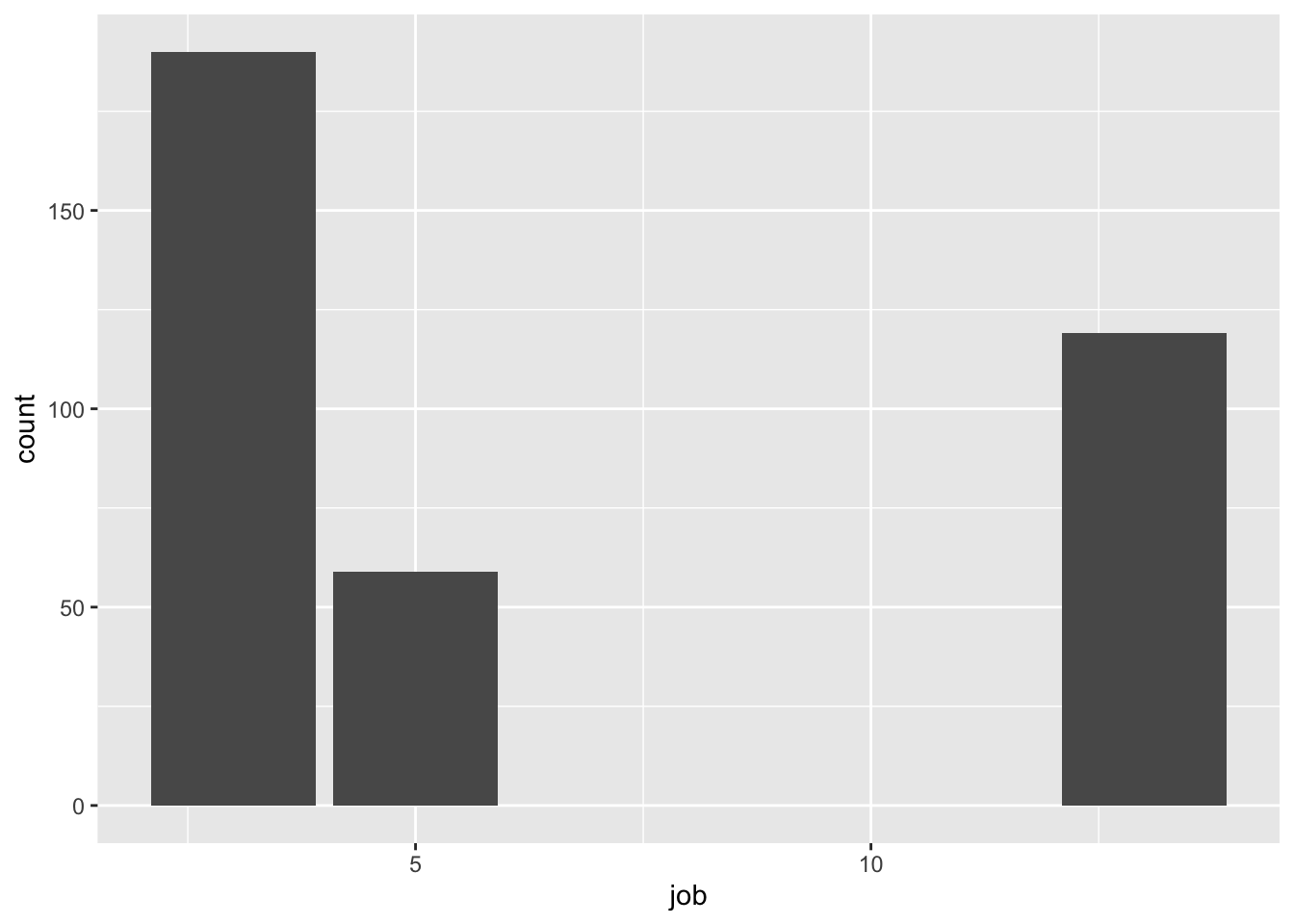
atus_filtered <- filter(atus_job,
job == 3 | job == 5 |job == 13)
ggplot(atus_filtered,aes(x=job)) + geom_bar()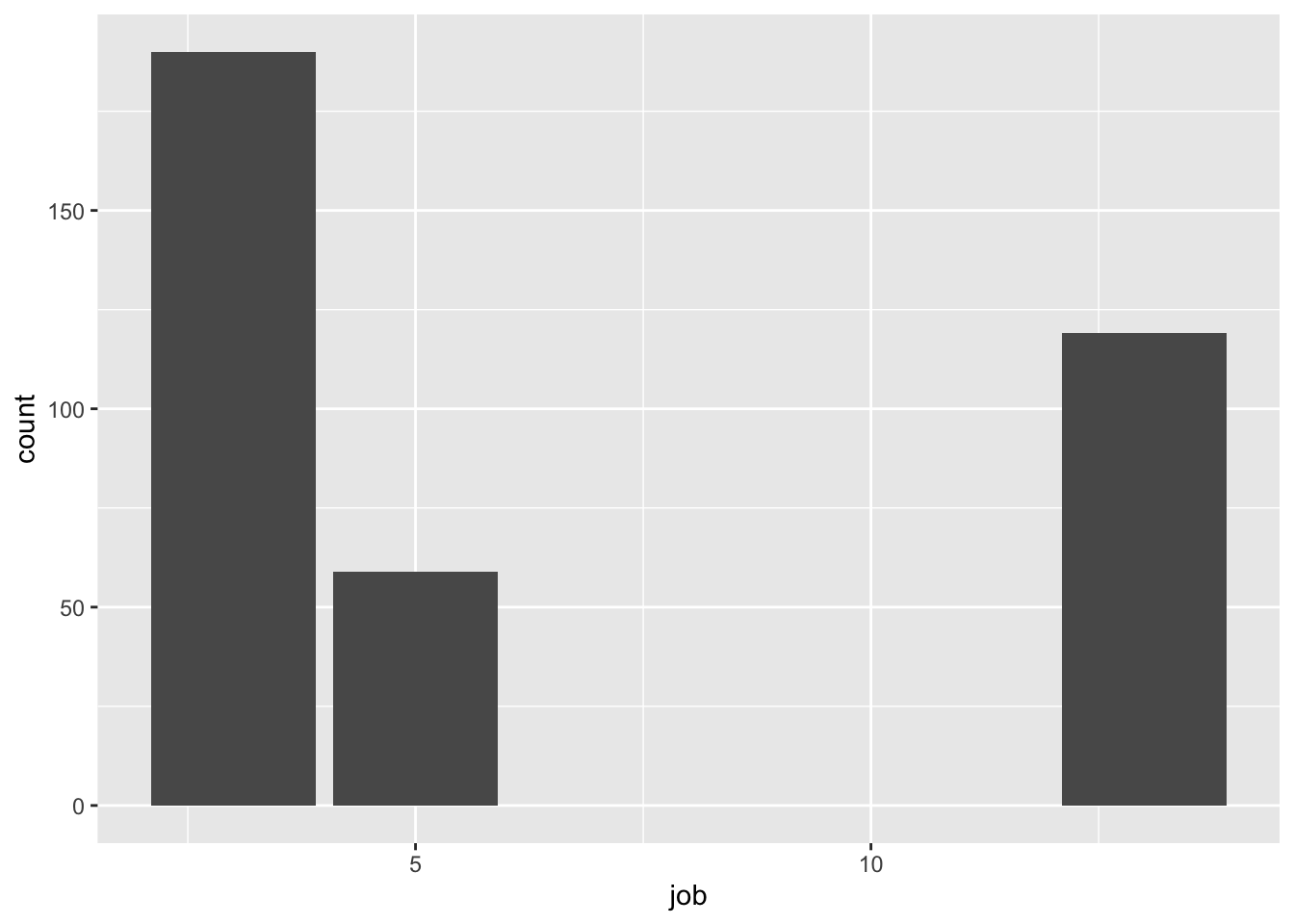
Visualizing Distributions & Relationships
Categorical distribution: bar plot
Numerical distribution: histogram, density plot
Numerical distribution vs. categorical variable: box plot
Two categorical variables: barplot filled with color or the same with
position = "fill"in the geom.Two-Three numerical variables: scatter plot with colors mapped to a variable. (see text)
Just a few categorical variables? Try faceting:
Exercise 1. Improve the plot below 2. Add a position = "fill" to the geom_bar(). Does it help?
ds <- filter(atus_job,job == 3 | job == 5 |job == 13)

ggplot(ds,aes(x=job, fill = job)) + geom_bar() +
  labs(fill = "Job")