# as usual, we will use the tidyverse
library(tidyverse)

# responses concerning personal activity
atus_act = read_csv('http://euclid.nmu.edu/~joshthom/dat309/data/ATUS/atusact_2025.dat')

# responses concerning demographics
atus_rost = read_csv('http://euclid.nmu.edu/~joshthom/dat309/data/ATUS/atusrost_2025.dat')

# responses concerning types of jobs
atus_job = read_csv('http://euclid.nmu.edu/~joshthom/dat309/data/ATUS/atusresp_2025.dat')

# respondent info with labor force status & earnings
atus_resp = read_csv('http://euclid.nmu.edu/~joshthom/dat309/data/ATUS/atusresp_2025.dat')

atus_dict = read_csv('http://euclid.nmu.edu/~joshthom/dat309/data/ATUS/atus_dict.csv')American Time Use Survey (ATUS)
Exercises
Exercise: Weighted vs. Unweighted Estimates
Every ATUS respondent carries a survey weight, TUFINLWGT, that adjusts for the survey’s sampling design so that estimates generalize to the U.S. civilian, noninstitutional population. If we ignore this weight and just count respondents directly, our estimates only describe the sample we happened to collect, not the population.
In this exercise we’ll compare the unweighted proportion of respondents in a given job category to the weighted proportion (which is what you would actually report).
atus_job <- atus_job |> rename("job" = TRDTOCC1)

# atus_job already has `job` (renamed from TRDTOCC1) and TUFINLWGT
jobs_subset <- atus_job |>
  filter(job == 3 | job == 5 | job == 13) |>
  mutate(
    job = case_when(
      job == 3  ~ "Computer/Math",
      job == 5  ~ "Life/Physical/Social Science",
      job == 13 ~ "Food Prep/Serving"
    )
  )

# Count the number of respondents in each job category, ignoring weights
jobs_subset |>
  count(job)
# A tibble: 3 × 2
job n
<chr> <int>
1 Computer/Math 190
2 Food Prep/Serving 119
3 Life/Physical/Social Science 59# Count again, but as a proportion of the total sample (unweighted)
# Unweighted: each respondent counts equally
unweighted <- jobs_subset |>
count(job) |>
mutate(prop_unweighted = n / sum(n))
head(unweighted)# A tibble: 3 × 3
job n prop_unweighted
<chr> <int> <dbl>
1 Computer/Math 190 0.516
2 Food Prep/Serving 119 0.323
3 Life/Physical/Social Science 59 0.160# Weighted: each respondent counts proportional to TUFINLWGT
weighted <- jobs_subset |>
group_by(job) |>
summarize(wgt_total = sum(TUFINLWGT)) |>
mutate(prop_weighted = wgt_total / sum(wgt_total))
head(weighted)# A tibble: 3 × 3
job wgt_total prop_weighted
<chr> <dbl> <dbl>
1 Computer/Math 3161044846. 0.449
2 Food Prep/Serving 2859319078. 0.406
3 Life/Physical/Social Science 1020963471. 0.145# Combine for comparison
unweighted |>
select(job, prop_unweighted) |>
left_join(weighted |> select(job, prop_weighted), by = "job")# A tibble: 3 × 3
job prop_unweighted prop_weighted
<chr> <dbl> <dbl>
1 Computer/Math 0.516 0.449
2 Food Prep/Serving 0.323 0.406
3 Life/Physical/Social Science 0.160 0.145Discussion questions
- How different are the weighted and unweighted proportions? Are the differences large enough to matter?
- Why might some groups be over- or under-represented in the raw sample relative to their weighted share of the population? (Hint: think about who tends to respond to time-use surveys, and how ATUS’s sampling design works.)
- If you were writing a news article citing “X% of workers are in food service,” which number — weighted or unweighted — should you report, and why?
Try it yourself: Repeat this comparison for a different set of job categories, or for a completely different variable (e.g., TESEX in atus_rost, or an activity code in atus_act). Does the gap between weighted and unweighted estimates get bigger or smaller?
Exercise: Cross-File Join and Group Comparison
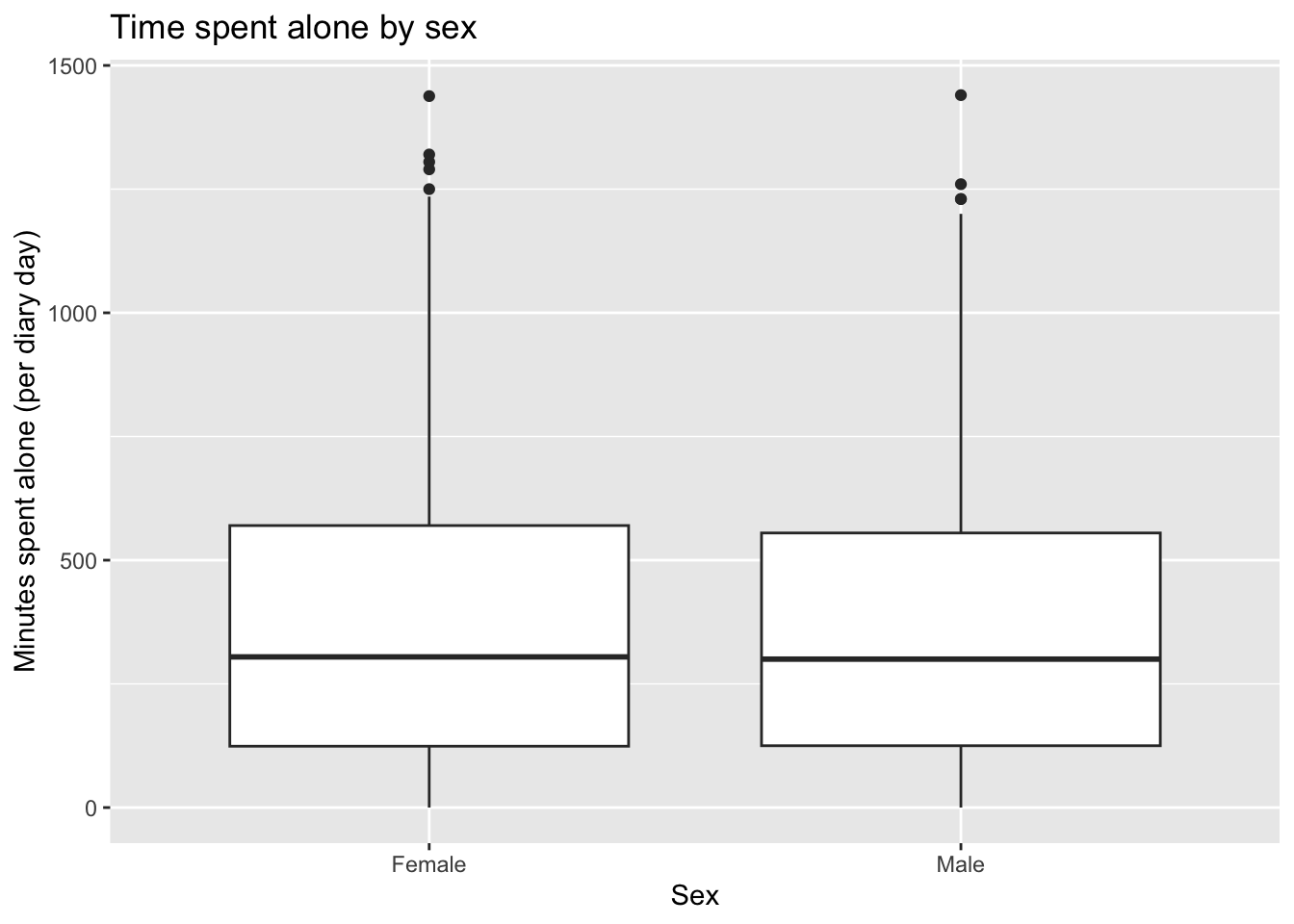
ATUS spreads information across several files that all share the TUCASEID identifier: atus_rost holds one row per household member, including demographics like sex (TESEX) and age (TEAGE), while atus_resp holds one row per respondent, including summary variables like TRTALONE (total minutes spent alone on the diary day). To ask a question like “does time spent alone differ by sex?” we need to bring these files together with joins.
atus_rost contains a row for every person in a respondent’s household, not just the respondent, so we restrict to TULINENO == 1 (the respondent) before joining, to avoid a many-to-many join.
# Demographics: one row per respondent
respondent_demo <- atus_rost |>
  filter(TULINENO == 1) |>
  select(TUCASEID, TESEX, TEAGE) |>
  mutate(
    sex = case_when(
      TESEX == 1 ~ "Male",
      TESEX == 2 ~ "Female"
    )
  )

# Join demographics onto respondent-level summary data (TRTALONE lives here, one row per person)
resp_with_demo <- atus_resp |>
  select(TUCASEID, TRTALONE) |>
  left_join(respondent_demo, by = "TUCASEID")

# Compare average time spent alone (TRTALONE) by sex
resp_with_demo |>
  filter(!is.na(sex)) |>
  group_by(sex) |>
  summarize(
    n = n(),
    mean_minutes_alone = mean(TRTALONE, na.rm = TRUE),
    median_minutes_alone = median(TRTALONE, na.rm = TRUE)
  )
# A tibble: 2 × 4
sex n mean_minutes_alone median_minutes_alone
<chr> <int> <dbl> <dbl>
1 Female 3224 365. 304.
2 Male 2922 360. 300 # Visualize the distribution
resp_with_demo |>
filter(!is.na(sex)) |>
ggplot(aes(x = sex, y = TRTALONE)) +
geom_boxplot() +
labs(
x = "Sex",
y = "Minutes spent alone (per diary day)",
title = "Time spent alone by sex"
)
Discussion questions
- Why did we filter
atus_rosttoTULINENO == 1before joining? What would go wrong if we skipped that step? TRTALONElives inatus_resp, one row per respondent — not inatus_act, which has one row per activity. Why does it make more sense to store a daily total likeTRTALONEat the respondent level rather than repeating it on every activity row?- Looking at the boxplot, does time spent alone appear to differ meaningfully by sex? What would you want to check before concluding this reflects a real difference (e.g., sample size, weighting, age composition)?
Try it yourself: Repeat this join-and-compare workflow using a different grouping variable from atus_rost (e.g., age bucketed into ranges) or a different outcome variable from atus_resp (e.g., TRTFAMILY, time spent with family). Does accounting for TUFINLWGT change your conclusions, as in the previous exercise?
Exercise: Data Dictionary Scavenger Hunt
ATUS variable names are cryptic by design (TEERNHRY, TRDTOCC1, TUFINLWGT, …), and the naming convention itself carries information: the second letter tells you the variable’s type — E = edited response, R = recode calculated from other variables, RT = summary/time-total variable, X = allocation flag, T = topcode flag. Reading documentation carefully is a core data science skill, and this dataset — assembled from six separate files by many different hands over many years — rewards that carefullyj.
TUFINLWGT is the final annual weight for an ATUS respondent-day record. Multiplying by this weight and summing across respondents gives population-level estimates (e.g., “average minutes per day the U.S. population age 15+ spent on X”).
TUFINLWGT is not a simple inverse-probability weight — it bakes in CPS’s original weight, ATUS’s day-based subsampling, nonresponse correction, and demographic post-stratification. For any population estimate, you should use it (e.g., weighted.mean(), or survey/srvyr package with the ATUS replicate weights if you need correct standard errors — ATUS also provides replicate weight variables for variance estimation, which plain weighted means won’t reflect).
In this exercise, you’ll pick unfamiliar variables, look them up in the data dictionary, classify them, and use what you find to build something.
# atus_dict has one row per variable, with its name and description
atus_dict |> slice_sample(n = 8)
# A tibble: 8 × 2
name description
<chr> <chr>
1 TUWHO_CODE Who was in the room with you / Who accompanied you?
2 TRTNOCHILD Total nonwork-related time respondent spent with nonown children <…
3 TELFS Edited: labor force status
4 TUIODP2 Have the usual activities and duties of your job changed since (mo…
5 TUFWK In the last seven days did you do any work for pay or profit?
6 TXAGE_EC TEAGE_EC: allocation flag
7 TULKDK3 TULKDK1 text: (third method)
8 TRTCC Total time spent during diary day providing secondary childcare fo…Part A: Look them up. For each variable below, find its row in atus_dict (or search atus_dictionary_simplified.qmd directly) and write down, in your own words, what it measures:
TEAGETELFSTRDTOCC1TUDIARYDAYTRTALONETXAGE
target_vars <- c("TEAGE", "TELFS", "TRDTOCC1", "TUDIARYDAY", "TRTALONE", "TXAGE")

atus_dict |>
  filter(name %in% target_vars)
# A tibble: 6 × 2
name description
<chr> <chr>
1 TEAGE Edited: age
2 TELFS Edited: labor force status
3 TRDTOCC1 Detailed occupation recode (main job)
4 TRTALONE Total nonwork-related time respondent spent alone (in minutes)
5 TUDIARYDAY Day of the week of diary day (day of the week about which the resp…
6 TXAGE TEAGE: allocation flag Part B: Classify by naming convention. Using the convention described above (second letter = E, R, X, or T), classify each variable in target_vars as an edited response, a recode, an allocation flag, or something else. Check your answers against the description text — does it match what you’d expect from the letter code?
Part C: Build something. Choose three variables you were not already using in Exercises 1 or 2 — at least one of them unfamiliar to you before this exercise — and use them together to produce one exploratory visualization or summary table from atus_act, atus_rost, or atus_job. For example, you might explore how TUDIARYDAY (day of week) relates to TRTALONE, or how TELFS (labor force status) relates to earnings.
Discussion questions
- Did any variable’s actual meaning surprise you, or differ from what you guessed based on its name alone?
- Pick one allocation flag (
X-prefixed) variable related to a variable you used in Exercise 1 or 2. What does a nonzero flag value tell you about that observation, and would you want to exclude or flag those rows in a real analysis? - Why might a dataset like ATUS — built from government surveys, revised across years, and merged from six files — need this much documentation to use correctly, compared to, say, a dataset you might create yourself in a spreadsheet?