library(tidyverse)
library(palmerpenguins)Introduction to Pivoting
Re-shaping data to make analysis easier
Brief introduction w/ penguins data
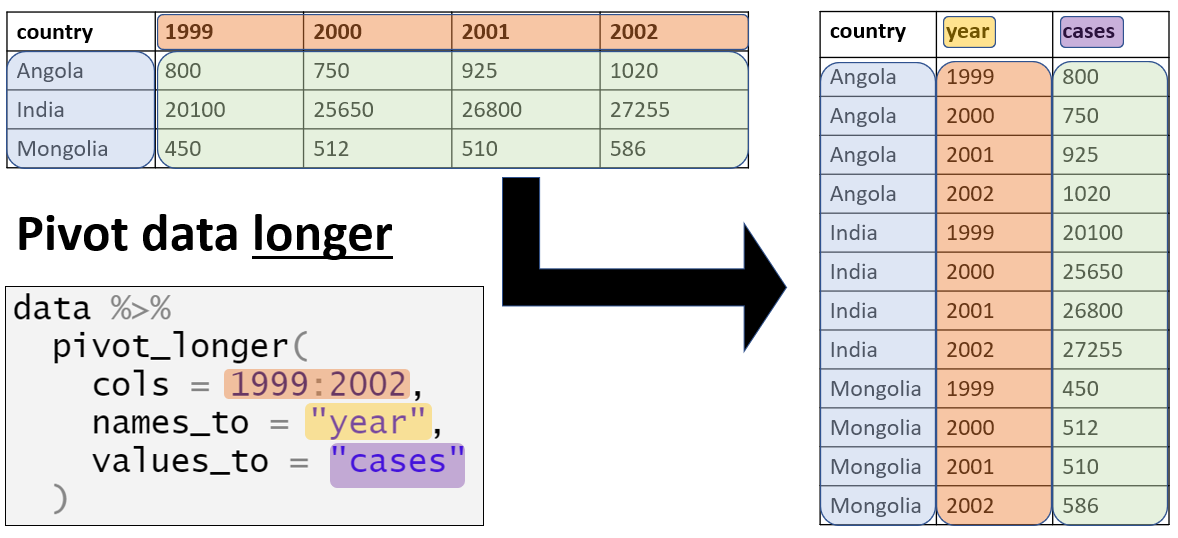
In the figure below, the data is reshaped, or made longer.
- Notice that some columns (the first) gain repeated entries.
- Also, notice that some variable names become entries in a new column.
- Also, the old entries that are spread out in rectangular form are sent to a new column.
 For more: link
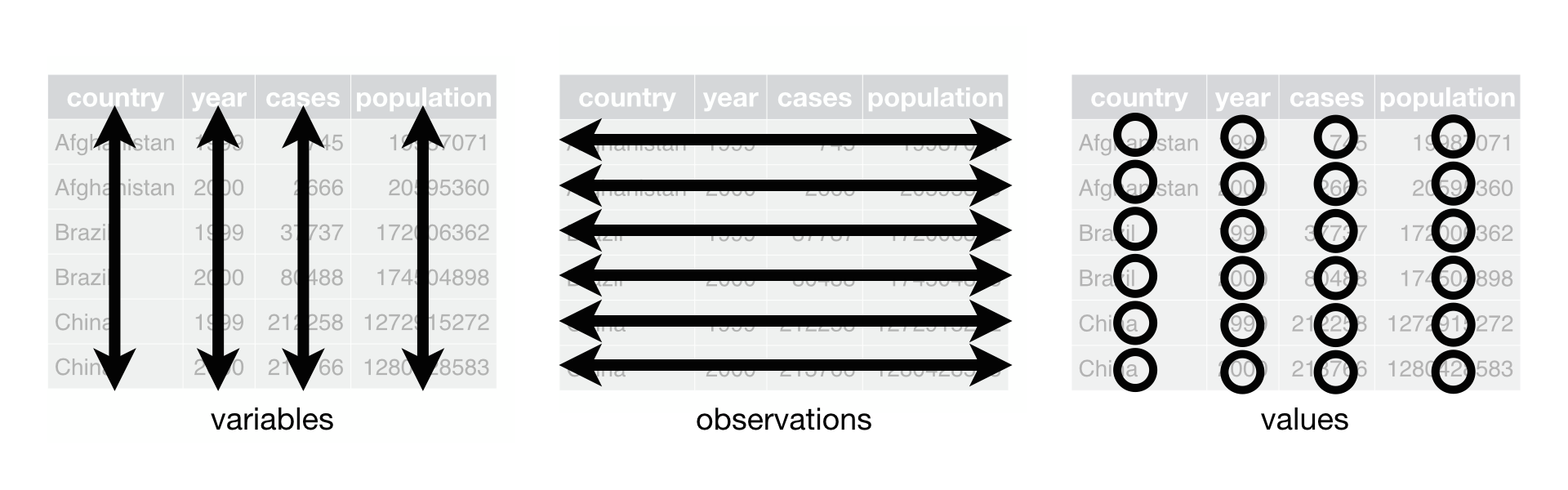
Pivoting is often used to tidy data, i.e., make it look like this:
But often data is gathered in a way that is convenient for the data collector, not the data analyst.
Example: stacking several numeric variables into one
# # # # # # # # # # # # # # # # # # # # # # # #
#
# Assumption: penguins is loaded from palmerpenguins (part of tidyverse)
#
# Tip: use only the data you need
d <- penguins |>
    select(species, island, sex, bill_length_mm, flipper_length_mm, body_mass_g) |>
    filter(!is.na(sex))

# Another tip: make a new variable that keeps track of row numbers
d <- d |> mutate(penguin = row_number())

print(d)
# A tibble: 333 × 7
species island sex bill_length_mm flipper_length_mm body_mass_g penguin
<fct> <fct> <fct> <dbl> <int> <int> <int>
1 Adelie Torgersen male 39.1 181 3750 1
2 Adelie Torgersen female 39.5 186 3800 2
3 Adelie Torgersen female 40.3 195 3250 3
4 Adelie Torgersen female 36.7 193 3450 4
5 Adelie Torgersen male 39.3 190 3650 5
6 Adelie Torgersen female 38.9 181 3625 6
7 Adelie Torgersen male 39.2 195 4675 7
8 Adelie Torgersen female 41.1 182 3200 8
9 Adelie Torgersen male 38.6 191 3800 9
10 Adelie Torgersen male 34.6 198 4400 10
# ℹ 323 more rowsbill_length_mm (bill length), flipper_length_mm (flipper length), and body_mass_g (body mass) are three separate numeric variables, each measured on its own scale, but each one could be thought of as “a value” for “a measure” tied to a penguin. Stack these three columns into one variable of measure (which column it came from) and one variable of value (what the number was).
d_pivoted <- d |> pivot_longer(
  cols = c(bill_length_mm, flipper_length_mm, body_mass_g),
  names_to = "measure",
  values_to = "value")
Group the pivoted data by sex & measure, then find the median value for each measure, for each sex.
d_grouped <- group_by(d_pivoted, species, measure) |>
  summarize(median_value = median(value, na.rm = TRUE))
Make a (side-by-side) bar chart colored by sex, whose height tracks the median value, faceted by measure so the very different scales don’t get squashed together.
d_grouped |> ggplot(
  aes(x = species, y = median_value)) +
  geom_point(aes(color = species), size = 5) +
  facet_wrap(
    ~measure,
    # let the y-axis scale vary by measure, since the three measures are on very different scales
    scales = "free_y",
    # label the facets with more human-readable names
    labeller = labeller(measure = c(
      bill_length_mm = "Bill Length (mm)",
      flipper_length_mm = "Flipper Length (mm)",
      body_mass_g = "Body Mass (g)"
    ))
  ) +
  labs(
    title = "Median Bill Length, Flipper Length, and Body Mass by Species",
    x = "Species",
    y = "Median Value",
    color = "Species"
  ) +
  scale_color_viridis_d() +
  scale_x_discrete(guide = guide_axis(n.dodge = 2))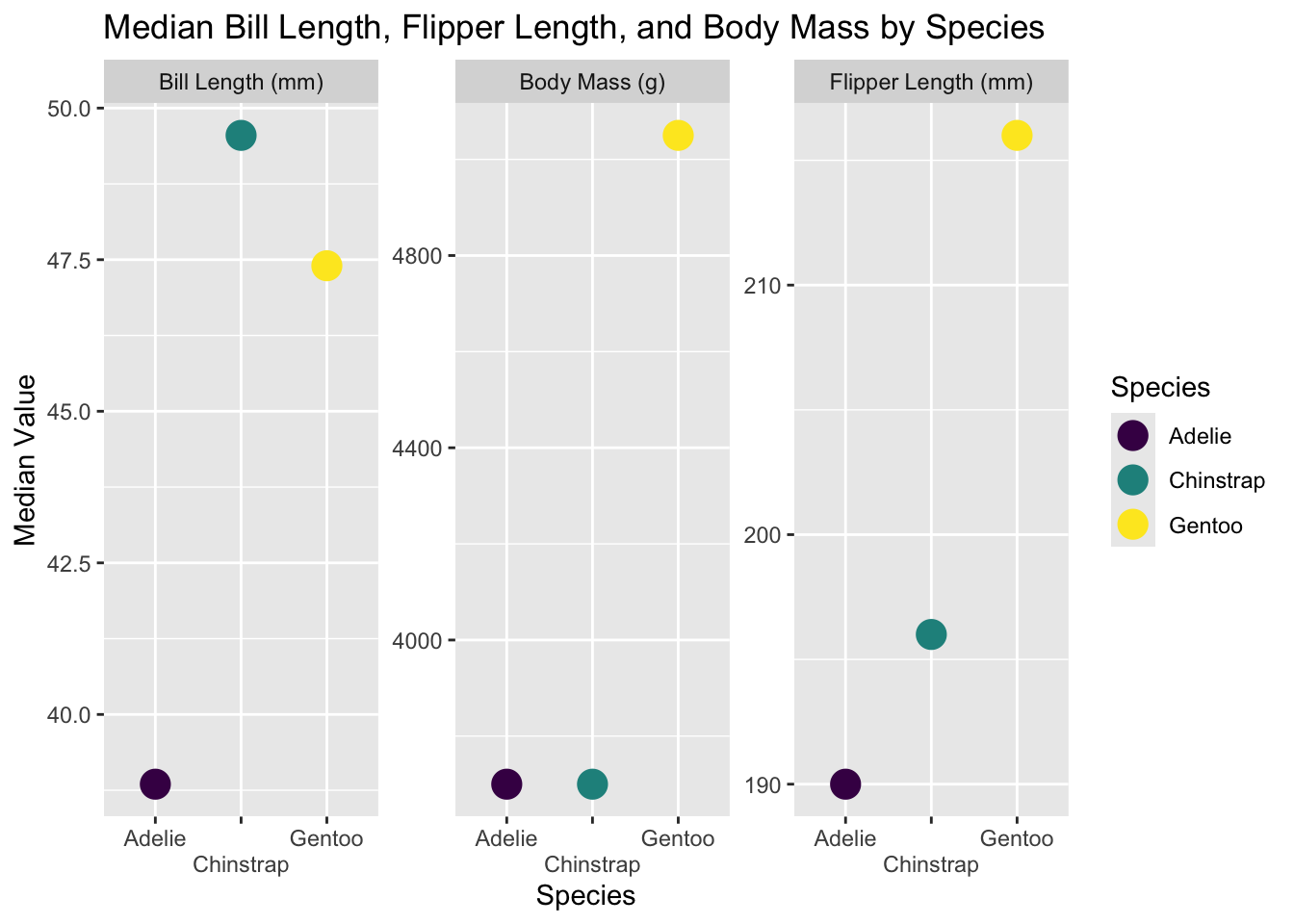
Class Exercise
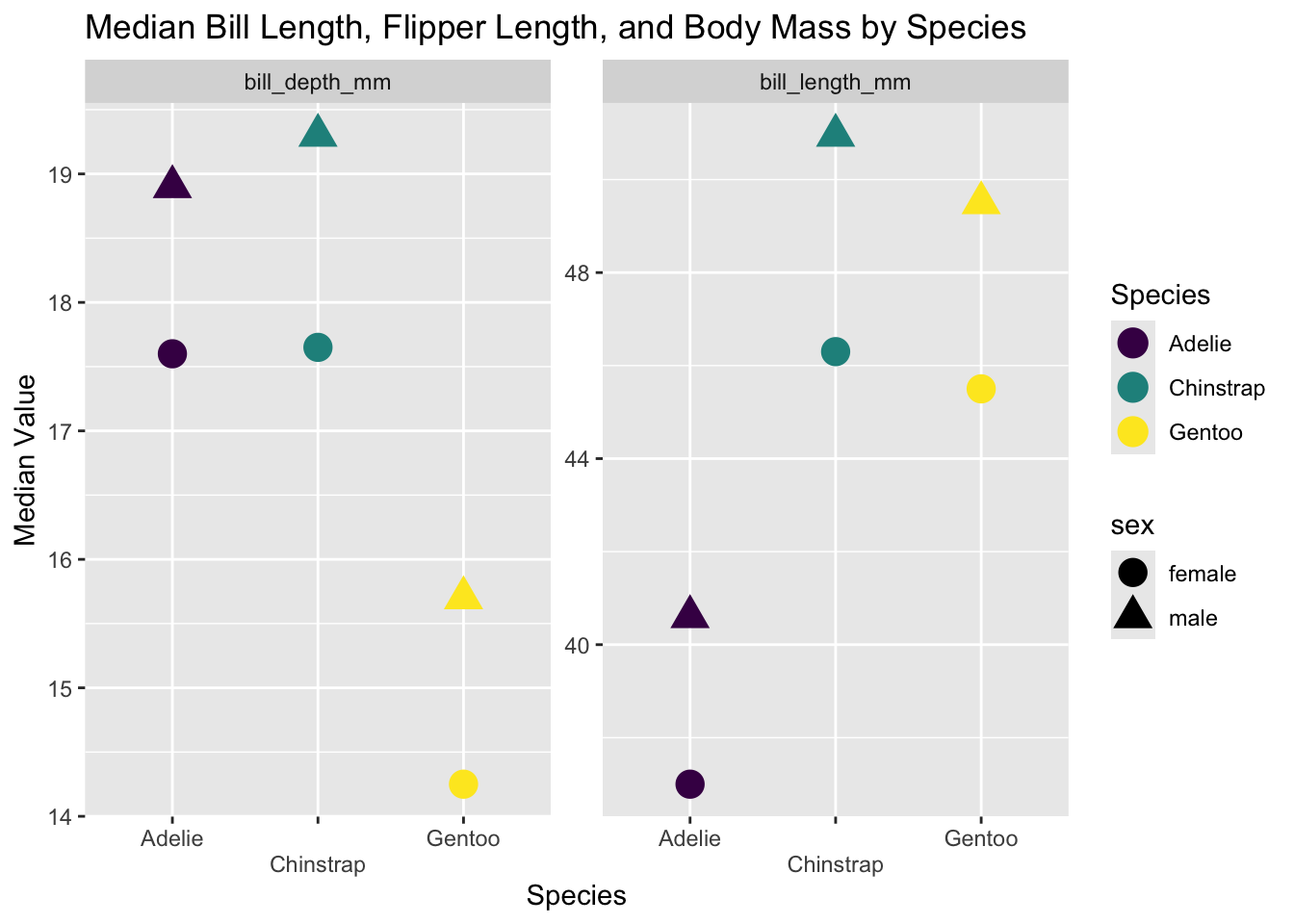
Change the plot & data above to compare bill length and bill depth by sex, faceted by species.
Spread a pair of columns onto a field of cells
Suppose instead we want a table that compares, for each species, the median body mass for males side-by-side with the median body mass for females — one row per species, one column per sex. Right now that comparison lives in long form (one row per species/sex combination):
mass_by_species_sex <- penguins |>
    filter(!is.na(sex)) |>
    group_by(species, sex) |>
    summarize(median_mass = median(body_mass_g, na.rm = TRUE), .groups = "drop")

mass_by_species_sex
# A tibble: 6 × 3
species sex median_mass
<fct> <fct> <dbl>
1 Adelie female 3400
2 Adelie male 4000
3 Chinstrap female 3550
4 Chinstrap male 3950
5 Gentoo female 4700
6 Gentoo male 5500Use pivot_wider() to spread the sex column out into its own set of columns, one per sex, filled in with median_mass. This makes the male-vs-female comparison much easier to read at a glance.
mass_by_species_sex |>
    pivot_wider(names_from = sex, values_from = median_mass)
# A tibble: 3 × 3
species female male
<fct> <dbl> <dbl>
1 Adelie 3400 4000
2 Chinstrap 3550 3950
3 Gentoo 4700 5500# or for a nicer looking table
# install.packages('gt')
library(gt)
mass_by_species_sex |>
gt() |>
tab_header(title = "Median Values by Species") | Median Values by Species | ||
| species | sex | median_mass |
|---|---|---|
| Adelie | female | 3400 |
| Adelie | male | 4000 |
| Chinstrap | female | 3550 |
| Chinstrap | male | 3950 |
| Gentoo | female | 4700 |
| Gentoo | male | 5500 |
If we wished to examine differences between the sexes, we could add a new column that computes the difference between the two median masses, then sort by that difference. (sex in penguins is coded as lowercase male/female, so those become the new column names.)
mass_by_species_sex |>
    pivot_wider(names_from = sex, values_from = median_mass) |>
    mutate(diff = male - female) |>
    arrange(desc(diff))
# A tibble: 3 × 4
species female male diff
<fct> <dbl> <dbl> <dbl>
1 Gentoo 4700 5500 800
2 Adelie 3400 4000 600
3 Chinstrap 3550 3950 400toy data
The same idea, on a simpler toy dataset: the data in table2 is not tidy — each country/year combination is split across two rows, one for cases and one for population. Make it tidy with pivot_wider().
table2# A tibble: 12 × 4
country year type count
<chr> <dbl> <chr> <dbl>
1 Afghanistan 1999 cases 745
2 Afghanistan 1999 population 19987071
3 Afghanistan 2000 cases 2666
4 Afghanistan 2000 population 20595360
5 Brazil 1999 cases 37737
6 Brazil 1999 population 172006362
7 Brazil 2000 cases 80488
8 Brazil 2000 population 174504898
9 China 1999 cases 212258
10 China 1999 population 1272915272
11 China 2000 cases 213766
12 China 2000 population 1280428583table2 |> pivot_wider(names_from = type, values_from = count)# A tibble: 6 × 4
country year cases population
<chr> <dbl> <dbl> <dbl>
1 Afghanistan 1999 745 19987071
2 Afghanistan 2000 2666 20595360
3 Brazil 1999 37737 172006362
4 Brazil 2000 80488 174504898
5 China 1999 212258 1272915272
6 China 2000 213766 1280428583Gather columns back into rows
The data in table4a is not tidy either. Instead of one row per country/year, each year has its own column of case counts.
table4a# A tibble: 3 × 3
country `1999` `2000`
<chr> <dbl> <dbl>
1 Afghanistan 745 2666
2 Brazil 37737 80488
3 China 212258 213766Make it tidy with pivot_longer(), turning those year columns into a year column and a cases column.
table4a |> pivot_longer(
    cols = -country,
    names_to = "year",
    values_to = "cases"
)
# A tibble: 6 × 3
country year cases
<chr> <chr> <dbl>
1 Afghanistan 1999 745
2 Afghanistan 2000 2666
3 Brazil 1999 37737
4 Brazil 2000 80488
5 China 1999 212258
6 China 2000 213766By default, the new columns are named name and value. Here we overrode those defaults with names_to = "year" and values_to = "cases" so the result is self-documenting.
Split a string into columns
table3 has two variables — cases and population — occupying a single cell in the rate column, separated by a /.
table3# A tibble: 6 × 3
country year rate
<chr> <dbl> <chr>
1 Afghanistan 1999 745/19987071
2 Afghanistan 2000 2666/20595360
3 Brazil 1999 37737/172006362
4 Brazil 2000 80488/174504898
5 China 1999 212258/1272915272
6 China 2000 213766/1280428583Split rate into two separate, usable columns with separate_wider_delim().
table3 |> separate_wider_delim(cols = rate, delim = "/", names = c("cases", "pop"))# A tibble: 6 × 4
country year cases pop
<chr> <dbl> <chr> <chr>
1 Afghanistan 1999 745 19987071
2 Afghanistan 2000 2666 20595360
3 Brazil 1999 37737 172006362
4 Brazil 2000 80488 174504898
5 China 1999 212258 1272915272
6 China 2000 213766 1280428583