Load data
Some of this data is in the library socviz.
More is available from this github repo and the 2024 data was scraped from Fox News.
── Attaching core tidyverse packages ──────────────────────── tidyverse 2.0.0 ──
✔ dplyr     1.2.1     ✔ readr     2.2.0
✔ forcats   1.0.1     ✔ stringr   1.6.0
✔ ggplot2   4.0.3     ✔ tibble    3.3.1
✔ lubridate 1.9.5     ✔ tidyr     1.3.2
✔ purrr     1.2.2
── Conflicts ────────────────────────────────────────── tidyverse_conflicts() ──
✖ dplyr::filter() masks stats::filter()
✖ dplyr::lag()    masks stats::lag()
ℹ Use the conflicted package (<http://conflicted.r-lib.org/>) to force all conflicts to become errors
library (socviz)<- mutate (election24_county_df,redblue = ifelse (votes_gop > votes_dem, "red" , "blue" ))<- read_csv ('zdata/2024_US_County_Level_Presidential_Results.csv' )
Rows: 3160 Columns: 10
── Column specification ────────────────────────────────────────────────────────
Delimiter: ","
chr (3): state_name, county_fips, county_name
dbl (7): votes_gop, votes_dem, total_votes, diff, per_gop, per_dem, per_poin...

ℹ Use `spec()` to retrieve the full column specification for this data.
ℹ Specify the column types or set `show_col_types = FALSE` to quiet this message.
<- mutate (edf, redblue = ifelse (votes_gop > votes_dem, "red" , "blue" ),fips = county_fips)
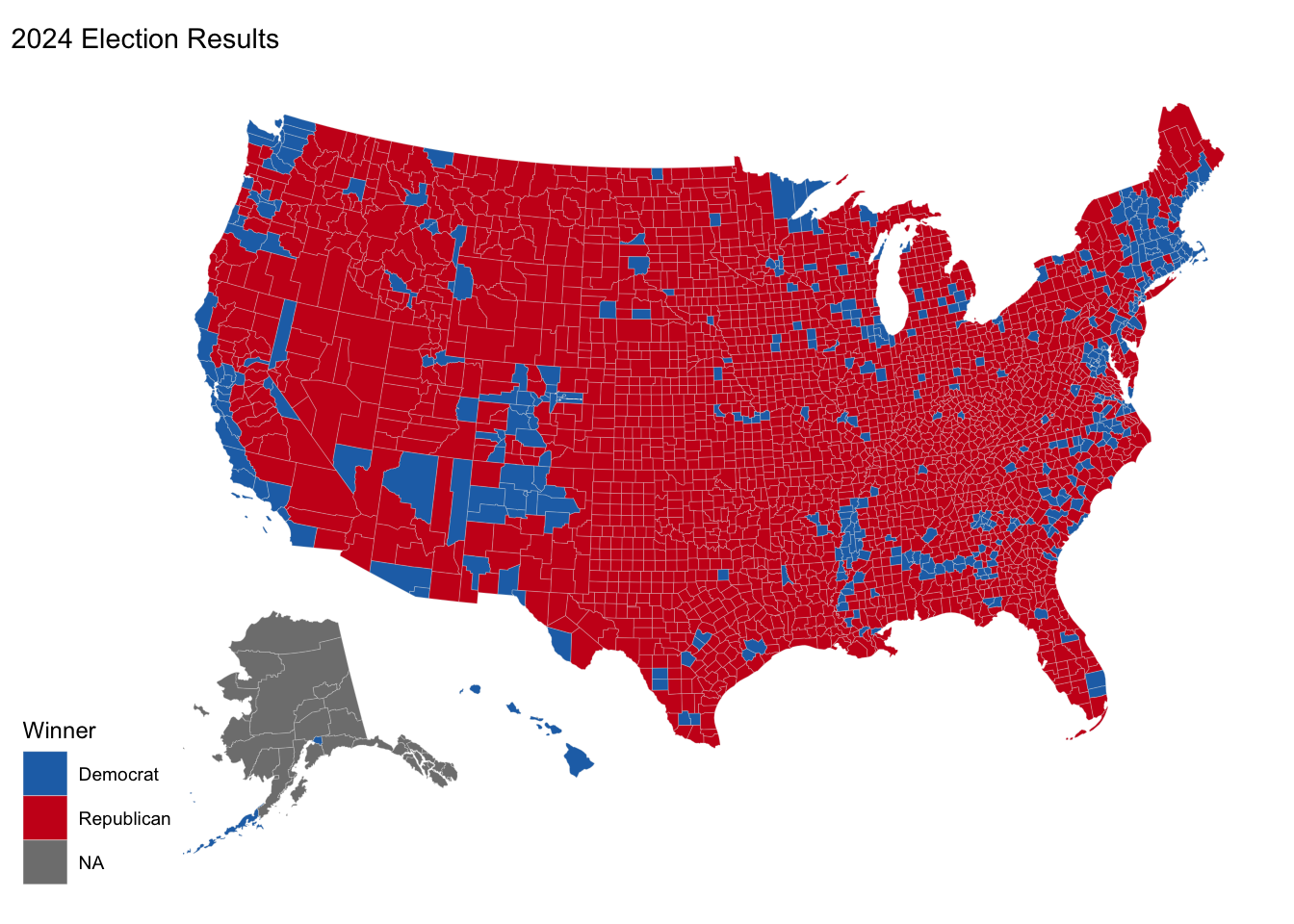
library (usmap)plot_usmap (data = edf,regions = "counties" , values = "redblue" ,color = "grey90" , linewidth = 0.05 ) + labs (title = "2024 Election Results" , fill = "Winner" ) + scale_fill_manual (values = c ("red" = "#cb181d" , "blue" = "#2171b5" ),labels = c ("red" = "Republican" , "blue" = "Democrat" )
Bring in population data
library (socviz)# Extract county population data <- counties_sf |> as_tibble () |> select (fips, name, pop, pop_dens)|> head ()
# A tibble: 6 × 4
  fips  name                       pop pop_dens
  <chr> <chr>                    <dbl>    <dbl>
1 01003 Baldwin County, Alabama 239945    143.
2 01069 Houston County, Alabama 107628    185.
3 01005 Barbour County, Alabama  24757     27.4
4 01119 Sumter County, Alabama   12020     13.2
5 05091 Miller County, Arkansas  42588     66.7
6 05133 Sevier County, Arkansas  15797     27.2
Join the population data with the election results data
<- left_join (edf, county_pop, by = "fips" )
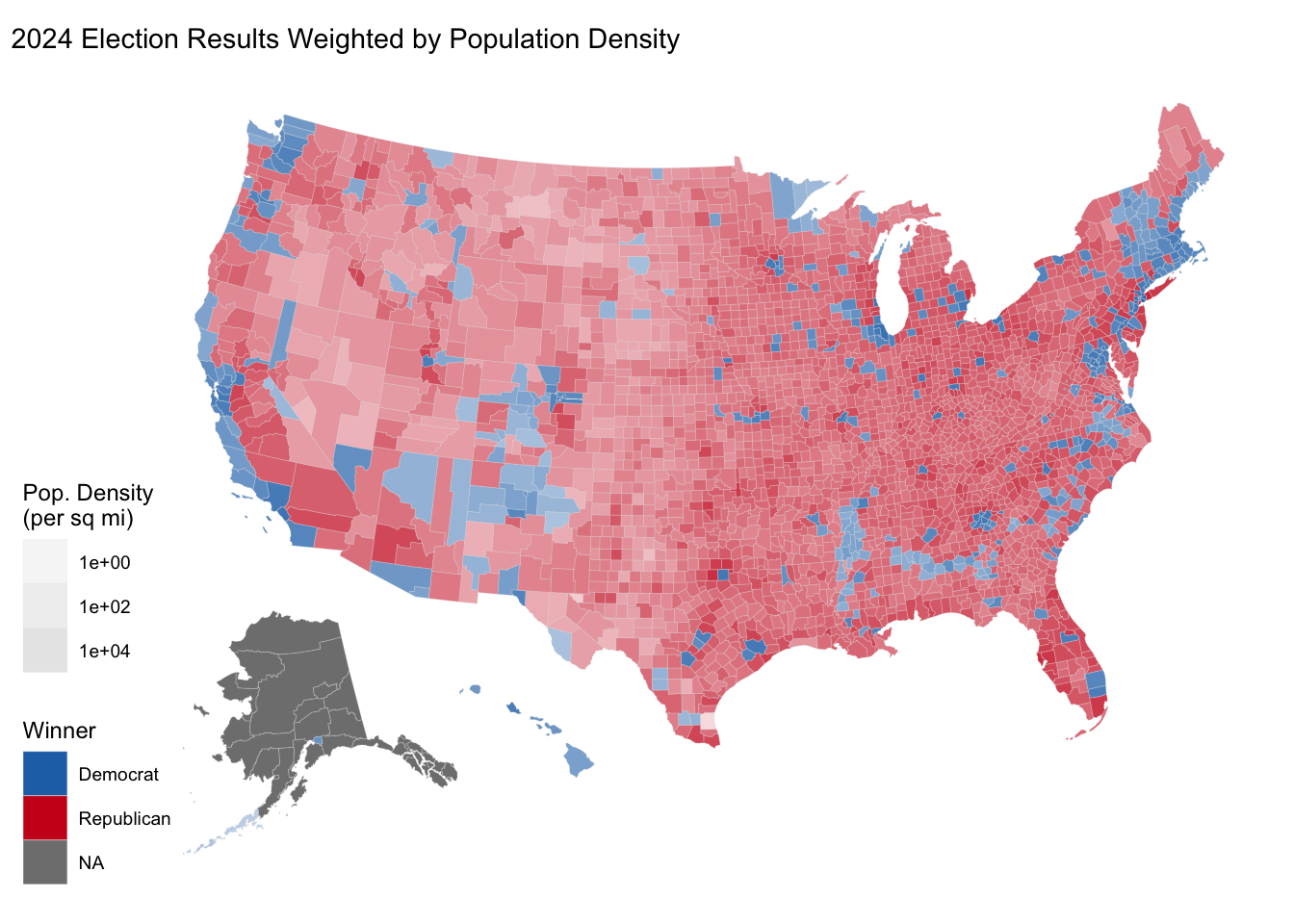
map population density to alpha in plot
plot_usmap (data = edf,regions = "counties" , values = "redblue" ,color = "grey90" , linewidth = 0.05 ) + aes (alpha = pop_dens) + scale_fill_manual (values = c ("red" = "#cb181d" , "blue" = "#2171b5" ),labels = c ("red" = "Republican" , "blue" = "Democrat" ),name = "Winner" + scale_alpha_continuous (range = c (0.15 , 1 ),trans = "log10" ,name = "Pop. Density \n (per sq mi)" + labs (title = "2024 Election Results Weighted by Population Density" )
Exercises
Repeat the plot for the 2020 and the 2016 election.
Join this data with the zillow data on home prices and compare red and blue counties with respect to home prices. You can use the geom_boxplot() function to compare the distributions of home prices for red and blue counties. Or just group_by and summarize.