library(tidyverse)
library(scales) # (change labels & breaks for axes & legends)Zillow Data
Overview
- Use a function and loop to load and clean zillow data.
- Summarize the zillow data and display mean & standard deviation using error bars.
- Visualize a summary of the zillow data on a US map
- Add
ggplotdetails to make a poster-ready plot
First load these
Data Import & Tidy
Download this file using R.
download.file("https://euclid.nmu.edu/~joshthom/dat309/week8/load_clean_zillow.R",
              destfile = "load_clean_zillow.R")
6 cleaned datasets:
This script creates 6 cleaned datasets from the Zillow data, and 2 functions.
nrin(income needed to rent)yts(years to save to buy),nra(percentage spent on an average house)zhvi_homezhvi_condozori_condo
2 functions:
clean_it(), a function that tidies any of the threeget_states(), a function that pulls a random subset of regions
To use them:
source('load_clean_zillow.R')

zyts <- clean_it(yts, "years_to_save")
compare “years to save” among different states
states_yts <- zyts |> group_by(state_name) |>
          summarize(
            mean_years = mean(years_to_save, na.rm = TRUE),
            # standard deviation
            sd_years = sd(years_to_save, na.rm = TRUE),
            # what's your n?
            n = n())

# look at the beginning of the data
states_yts |> head()
# A tibble: 6 × 4
state_name mean_years sd_years n
<chr> <dbl> <dbl> <int>
1 AK 7.16 0.545 352
2 AL 6.49 1.19 2112
3 AR 6.15 1.10 1056
4 AZ 9.12 2.60 1056
5 CA 12.4 3.61 4576
6 CO 9.81 2.04 1232Plot the means & standard deviations across states.
states_yts |> ggplot(
  aes(x = state_name, y = mean_years)) +
  geom_point() +
  # notice the +/- in the ymin & ymax
  geom_errorbar(aes(ymin = mean_years - sd_years, ymax = mean_years + sd_years)) +
  # instead of swapping x,y aesthetics use coord_flip()
  coord_flip()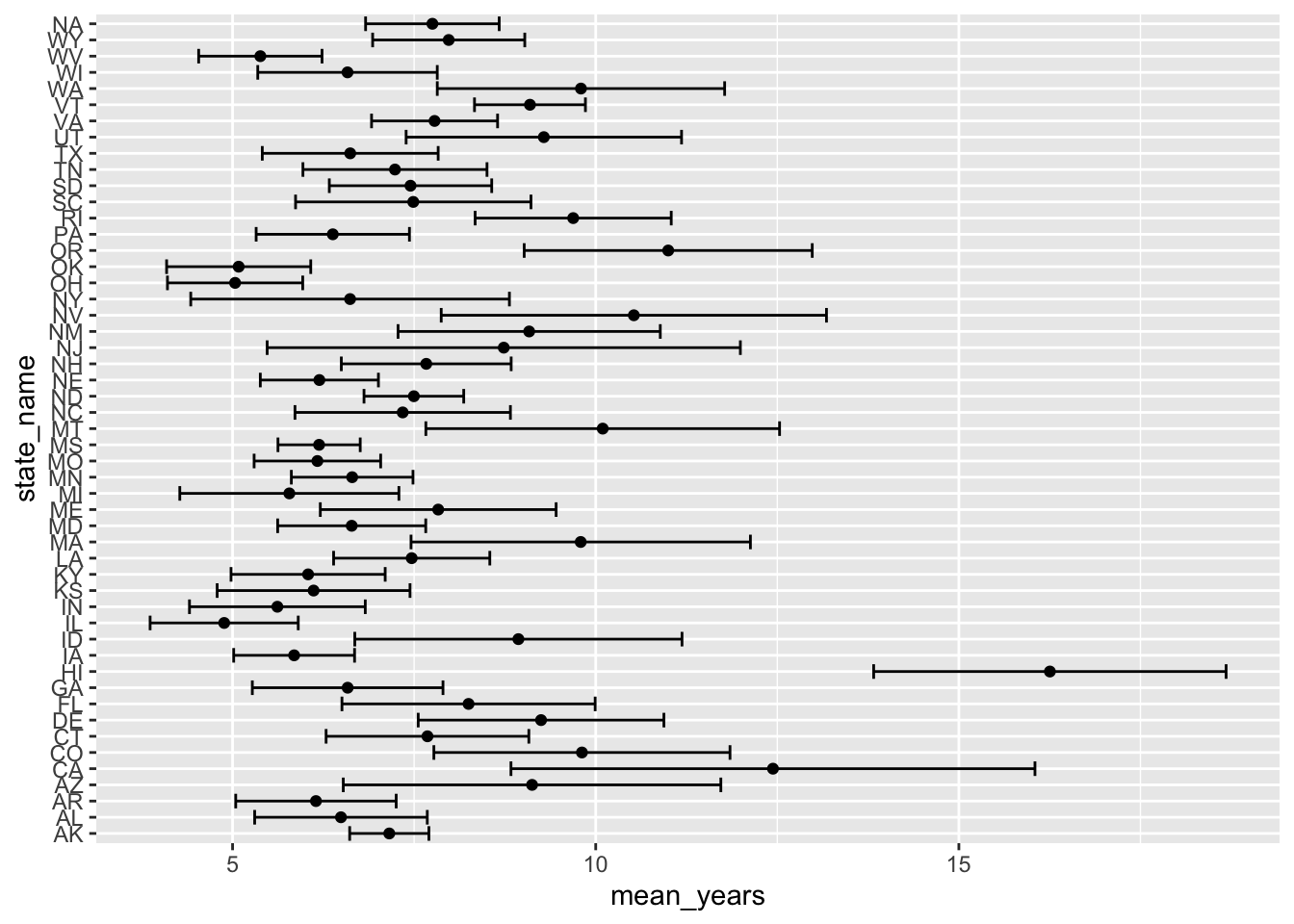
Improve by reordering the state_name
states_yts |>
  mutate(state_name = reorder(state_name,mean_years)) |>
  ggplot(
    aes(x = state_name, y = mean_years)) +
    geom_point() +
    geom_errorbar(
      aes(ymin = mean_years - sd_years,
          ymax = mean_years + sd_years)) +
    labs(x = "Number of Years of Saving before Buying") +
    coord_flip()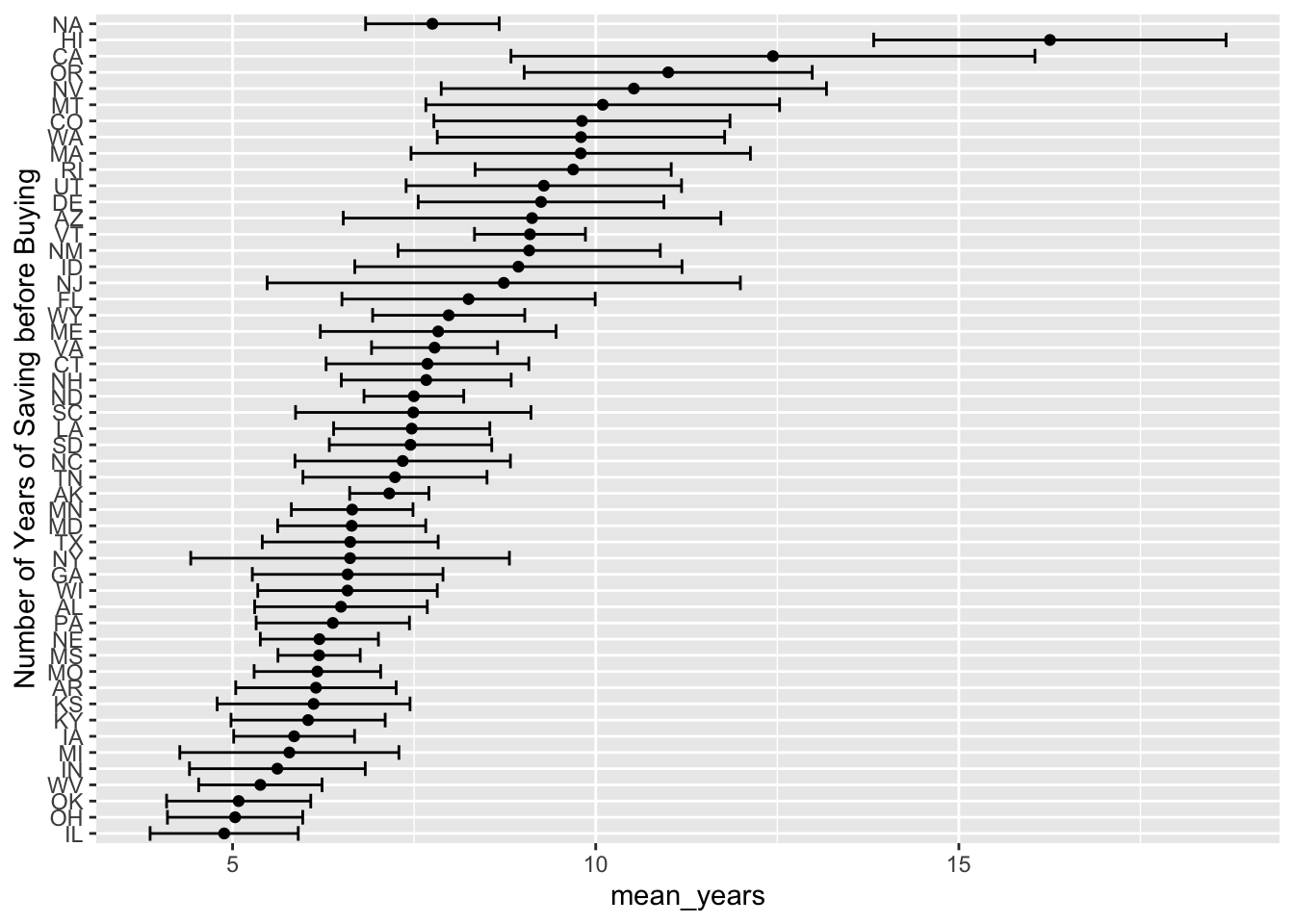
Exercises
- In the plot above replace the
NAwithNational_Averageor something similar. - Produce this plot for a single year’s worth of data.
- Use this data to color a map of the US.
We’ll tackle Exercise 3. here:
The usmap package
To make plots on a map of the US, use the package usmap link.
One key is the “fips code”, a simple code unique to US states & counties. For example,
# install.packages("usmap")
library(usmap)
# the fips() function lives in the package usmap
fips(state = 'MI', county = 'Marquette')
[1] "26103"Use the fips() function to mutate a new variable (also called fips) that the mapping utility can use for plotting.
# need a fips code to plot
states_yts <- states_yts |> mutate(fips = fips(state_name))

# this is NOT a ggplot gadget, this is why you must use quotes
# when accessing the variables in your data
plot_usmap(data = states_yts,
           values = "mean_years")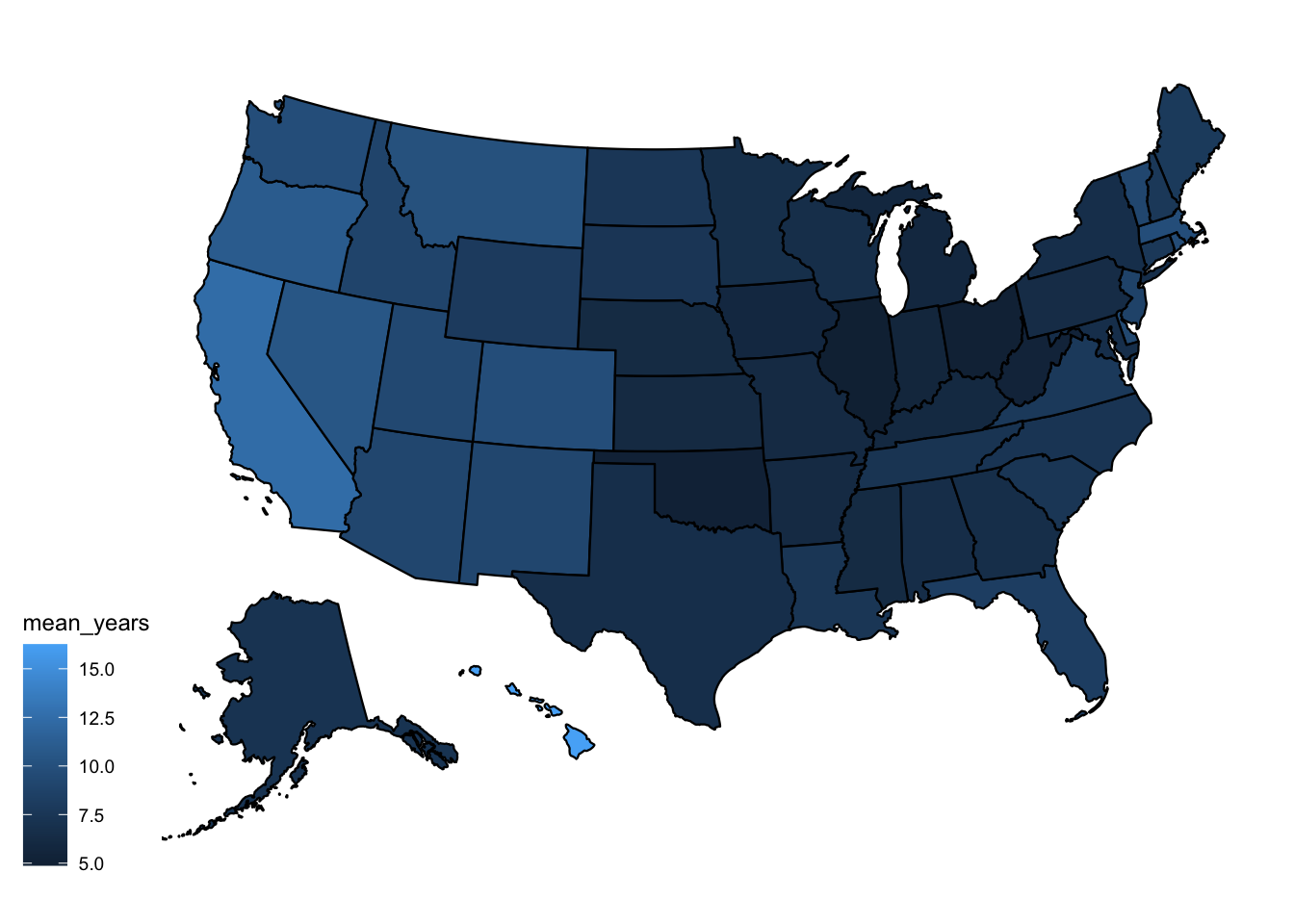
Undergo a similar analysis & exercise for different data.
Income Needed to Buy
library(scales)
# load the data
znrin <- clean_it(nrin, "income_needed")

# look at just Michigan
mi <- get_states(znrin, "MI", 200)

# examine income needed vs. region
reg_mi <- group_by(mi, region_name) |>
  summarize(mean_income_needed = mean(income_needed, na.rm = TRUE),
            sd_income_needed = sd(income_needed, na.rm = TRUE))

reg_mi |>
  mutate(region_name = reorder(region_name,mean_income_needed)) |>
  ggplot(
    aes(x = region_name,
        y = mean_income_needed,
        color = region_name)) + # associate color with region name
  geom_point() + # a single point tracking the mean
  geom_errorbar(
    aes(ymin = mean_income_needed - sd_income_needed,
         ymax = mean_income_needed + sd_income_needed)) + # for the SD
  # for poster-ready plots, create good labels
  labs(y = "Income",
       x = "Region",
       title = "Income Needed Before Buying",
       subtitle = "Michigan",
       caption = "Data from Zillow") +
  scale_y_continuous(labels = label_dollar()) +
  scale_color_viridis_d(end = .75) +  # end the spectrum at greenish
  theme(legend.position = "none",
        axis.text.y = element_text(size = 7)) +
  coord_flip()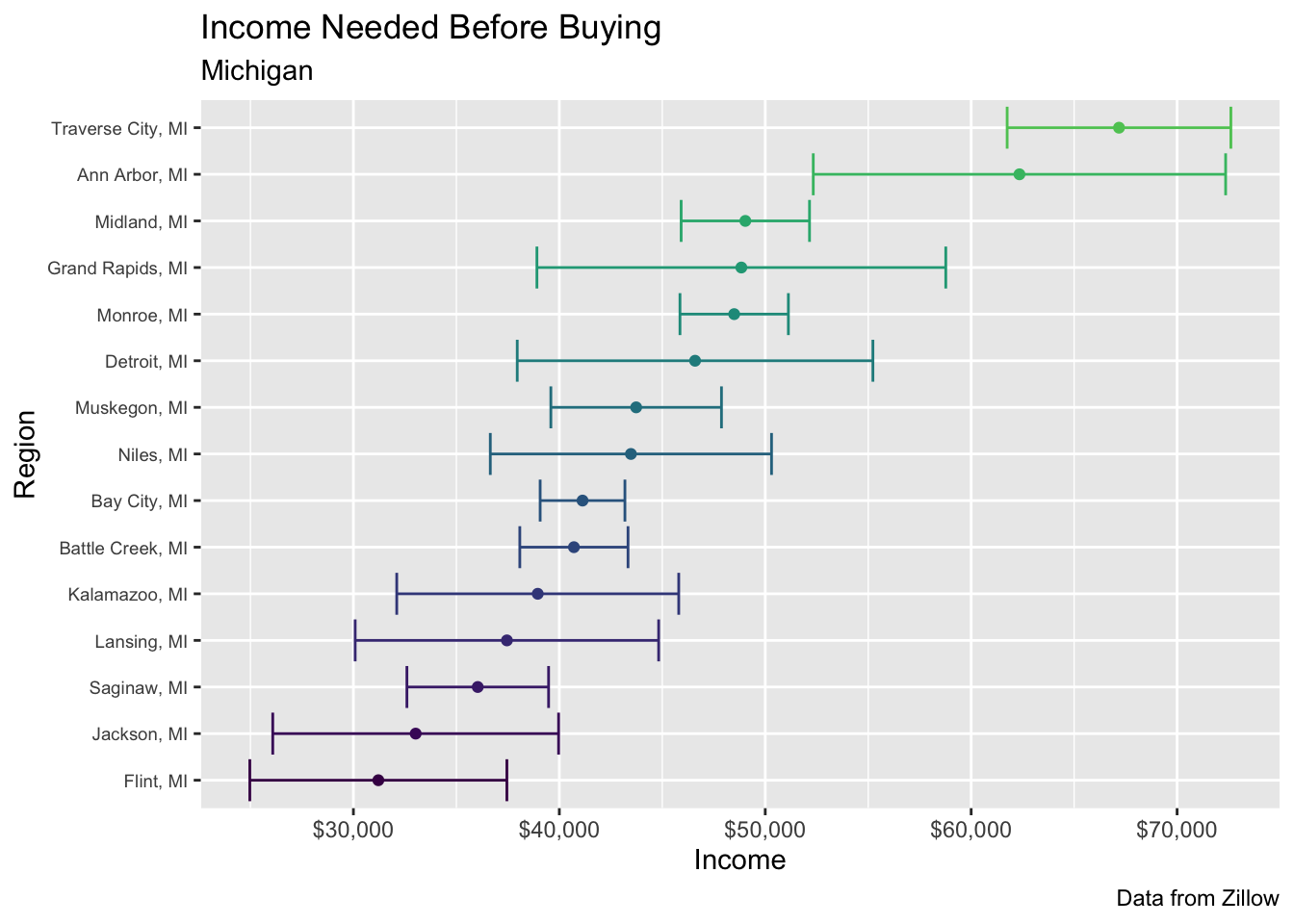
Exercise
- Repeat for the
nradata.
Bonus: Documenting Your Functions
R functions are easy to write and easy to forget the details of a few weeks later. The docstring package (built on the same roxygen2 comment syntax used in R packages) lets you attach on-the-fly help to a function with specially-formatted #' comments above its body:
install.packages("docstring")
library(docstring)

clean_it <- function(data, values) {
  #' Tidy a Zillow wide-format dataset
  #'
  #' Pivots a Zillow dataset (one column per month) into long format.
  #' @param data data frame read in by load_clean_zillow.R (e.g. nrin, yts, nra)
  #' @param values string naming the value column to create, e.g. "years_to_save"
  #' @return the same data, pivoted longer with a date column
  data <- pivot_longer(data,
    cols = starts_with("x"),
    names_to = "date",
    values_to = values)
  data |> mutate(date = as_date(str_replace(date, "x", "")))
}

docstring(clean_it)
Run ?clean_it (or docstring(clean_it)) after defining it this way, and you get the help page back.
Or, when you’re typing the function, the docstring will appear as you type – handy once you’re juggling several functions across a project.