# how much data we got?
library(haven)
library(tidyverse)
ipums_2024 <- read_rds(
    'https://euclid.nmu.edu/~joshthom/dat309/data/IPUMS/ipums_2024.rds'
)eda with ipums data
The code below shows some basic exploratory data analysis (EDA) with the IPUMS dataset. The goal is to get a sense of the distribution of rent burden by degree field, and to see if there are any patterns by sex or race.
load librariqes and data
size, shape, and classes present in the data
# count the number of rows in the dataset
ipums_2024 |> count()
# A tibble: 1 × 1
n
<int>
1 3422888# count the number of columns in the dataset
ipums_2024 |> ncol()[1] 20# get the datatypes of each column in the dataset
glimpse(ipums_2024)Rows: 3,422,888
Columns: 20
$ year <int> 2024, 2024, 2024, 2024, 2024, 2024, 2024, 2024, 2024, 2024, …
$ sample <int+lbl> 202401, 202401, 202401, 202401, 202401, 202401, 202401, …
$ serial <dbl> 1, 2, 3, 4, 5, 6, 7, 8, 9, 10, 11, 12, 13, 14, 15, 16, 17, 1…
$ cbserial <dbl> 2.02401e+12, 2.02401e+12, 2.02401e+12, 2.02401e+12, 2.02401e…
$ hhwt <dbl> 41, 52, 31, 4, 19, 64, 56, 40, 74, 40, 63, 55, 22, 3, 17, 52…
$ cluster <dbl> 2.024e+12, 2.024e+12, 2.024e+12, 2.024e+12, 2.024e+12, 2.024…
$ strata <dbl> 250001, 260001, 140101, 280201, 80001, 200001, 170001, 14040…
$ rentgrs <int+lbl> 0, 0, 0, 0, 0, 0, 0, 0, 0, 0, 0, 0, 0, 0, 0, 0, 0, 0, 0,…
$ pernum <dbl> 1, 1, 1, 1, 1, 1, 1, 1, 1, 1, 1, 1, 1, 1, 1, 1, 1, 1, 1, 1, …
$ perwt <dbl> 41, 52, 31, 4, 19, 64, 56, 40, 74, 40, 63, 55, 22, 3, 17, 52…
$ sex <fct> Male, Male, Female, Female, Male, Male, Male, Male, Female, …
$ age <int+lbl> 59, 43, 75, 22, 51, 20, 66, 28, 18, 64, 21, 19, 55, 35, …
$ race <fct> "Black/African American", "White", "Black/African American",…
$ raced <int+lbl> 234, 177, 234, 600, 177, 177, 201, 234, 234, 177, 201, 1…
$ degfield <fct> "N/A", "N/A", "N/A", "N/A", "N/A", "N/A", "N/A", "N/A", "N/A…
$ degfieldd <int+lbl> 0, 0, 0, 0, 0, 0, 0, 0, 0, 0, 0, 0, 0, 0, 0, 0, 0, 0, 0,…
$ uhrswork <int+lbl> 30, 0, 0, 0, 0, 0, 0, 72, 20, 0, 0, 0, 0, 0, 40, 35, 15,…
$ inctot <dbl+lbl> 18500, 0, 27100, 1000, 0, 0, 16400, 30000, …
$ tranwork <fct> "N/A", "N/A", "N/A", "N/A", "N/A", "N/A", "N/A", "N/A", "N/A…
$ trantime <dbl+lbl> 0, 0, 0, 0, 0, 0, 0, 0, 0, 0, 0, 0, 0, 0, 5, 0, 0, 0, 0,…# alternative one-liner to get a basic summary of the dataset
# uncomment below to install skim
# pak::pkg_install("skimr")
library(skimr)
skim(ipums_2024)| Name | ipums_2024 |
| Number of rows | 3422888 |
| Number of columns | 20 |
| _______________________ | |
| Column type frequency: | |
| factor | 4 |
| numeric | 16 |
| ________________________ | |
| Group variables | None |
Variable type: factor
| skim_variable | n_missing | complete_rate | ordered | n_unique | top_counts |
|---|---|---|---|---|---|
| sex | 0 | 1 | FALSE | 2 | Fem: 1743242, Mal: 1679646, Mis: 0 |
| race | 0 | 1 | FALSE | 9 | Whi: 2286695, Two: 361498, Bla: 292257, Oth: 194306 |
| degfield | 0 | 1 | FALSE | 38 | N/A: 2459111, Bus: 186514, Edu: 113999, Med: 78613 |
| tranwork | 0 | 1 | FALSE | 13 | N/A: 1845121, Aut: 1234645, Wor: 217824, Wal: 43305 |
Variable type: numeric
| skim_variable | n_missing | complete_rate | mean | sd | p0 | p25 | p50 | p75 | p100 | hist |
|---|---|---|---|---|---|---|---|---|---|---|
| year | 0 | 1 | 2.024000e+03 | 0.00 | 2.02400e+03 | 2.024000e+03 | 2.024000e+03 | 2.024000e+03 | 2.024000e+03 | ▁▁▇▁▁ |
| sample | 0 | 1 | 2.024010e+05 | 0.00 | 2.02401e+05 | 2.024010e+05 | 2.024010e+05 | 2.024010e+05 | 2.024010e+05 | ▁▁▇▁▁ |
| serial | 0 | 1 | 7.645721e+05 | 445088.53 | 1.00000e+00 | 3.748090e+05 | 7.616925e+05 | 1.155867e+06 | 1.531614e+06 | ▇▇▇▇▇ |
| cbserial | 0 | 1 | 2.024001e+12 | 2146567.19 | 2.02400e+12 | 2.024000e+12 | 2.024001e+12 | 2.024001e+12 | 2.024010e+12 | ▇▁▁▁▁ |
| hhwt | 0 | 1 | 9.768000e+01 | 89.49 | 1.00000e+00 | 4.700000e+01 | 7.100000e+01 | 1.150000e+02 | 2.300000e+03 | ▇▁▁▁▁ |
| cluster | 0 | 1 | 2.024008e+12 | 4450885.26 | 2.02400e+12 | 2.024004e+12 | 2.024008e+12 | 2.024012e+12 | 2.024015e+12 | ▇▇▇▇▇ |
| strata | 0 | 1 | 4.887943e+05 | 847235.38 | 1.00010e+04 | 1.000010e+05 | 2.306480e+05 | 4.798120e+05 | 8.100351e+06 | ▇▁▁▁▁ |
| rentgrs | 0 | 1 | 3.843500e+02 | 893.42 | 0.00000e+00 | 0.000000e+00 | 0.000000e+00 | 0.000000e+00 | 1.323300e+04 | ▇▁▁▁▁ |
| pernum | 0 | 1 | 2.050000e+00 | 1.33 | 1.00000e+00 | 1.000000e+00 | 2.000000e+00 | 3.000000e+00 | 2.000000e+01 | ▇▁▁▁▁ |
| perwt | 0 | 1 | 9.936000e+01 | 91.78 | 1.00000e+00 | 4.700000e+01 | 7.200000e+01 | 1.170000e+02 | 2.300000e+03 | ▇▁▁▁▁ |
| age | 0 | 1 | 4.339000e+01 | 24.03 | 0.00000e+00 | 2.300000e+01 | 4.400000e+01 | 6.400000e+01 | 9.600000e+01 | ▆▇▇▇▂ |
| raced | 0 | 1 | 2.965600e+02 | 247.66 | 1.01000e+02 | 1.380000e+02 | 1.770000e+02 | 2.340000e+02 | 9.900000e+02 | ▇▁▁▁▁ |
| degfieldd | 0 | 1 | 1.222150e+03 | 2155.60 | 0.00000e+00 | 0.000000e+00 | 0.000000e+00 | 2.300000e+03 | 6.403000e+03 | ▇▁▁▁▂ |
| uhrswork | 0 | 1 | 1.936000e+01 | 20.98 | 0.00000e+00 | 0.000000e+00 | 8.000000e+00 | 4.000000e+01 | 9.900000e+01 | ▇▂▅▁▁ |
| inctot | 0 | 1 | 1.536766e+06 | 3542444.43 | -1.15000e+04 | 1.380000e+04 | 4.400000e+04 | 1.095000e+05 | 9.999999e+06 | ▇▁▁▁▂ |
| trantime | 0 | 1 | 1.081000e+01 | 19.83 | 0.00000e+00 | 0.000000e+00 | 0.000000e+00 | 1.500000e+01 | 1.950000e+02 | ▇▁▁▁▁ |
sk <- skim(ipums_2024)select columns and filter anomalies
Filtering anomalies is a choice. It will depend on your research question and the type of analysis you want to do. For example, if you are interested in rent burden, you may want to filter out those with no rent or no income. If you are interested in commute time, you may want to filter out those with no commute time or those who work from home. The code below is an example of how to filter the data for those with a degree field, full-time workers, and not overworked.
cn <- ipums_2024 |> colnames()
cols2drop <- c(2,3,4,5,6,7,10,14,16)

# drop the columns we don't need
ipums_2024 <- ipums_2024 |> select(-cn[cols2drop])

# filter the dataset to only include rows with complete data
ipm <- ipums_2024 |> filter(
    degfield != "N/A", # only include those with a degree field
    uhrswork >= 35, # full-time workers
    uhrswork <= 60, # not overworked
)
See what data is n/a or coded strangely
ipm <- ipm |> mutate(
    insign = case_when(
        inctot == 9999999 ~ "N/A",
        inctot < 0 ~ "Negative",
        TRUE ~ "Valid"
    ),
    .after = 1
)

# see how many rows are in each category
ipm |> count(insign)
# A tibble: 2 × 2
insign n
<chr> <int>
1 Negative 159
2 Valid 557840rent burden
Next, we can create a new variable:
NoteDefinition
rent burden: the ratio of annual rent to annual income
We also define a categorical variable for rent burden using case_when(). The syntax is as follows:
case_when(
    condition1 ~ value1, # this gets evaluated first
    condition2 ~ value2, # this gets evaluated second
    TRUE ~ default_value # catch-all case
)
We also filter out any rows with missing values for rent or income.
ipm <- ipm |>
    filter(rentgrs != 0, insign == "Valid") |>
    mutate(
        rent_burden = (rentgrs * 12) / inctot,
        rel_rent_burden = case_when(
            rent_burden < 0.3 ~ "Low",
            rent_burden >= 0.3 & rent_burden < 0.5 ~ "Moderate",
            rent_burden >= 0.5 ~ "High"),
        scale_rent_burden = rent_burden - 0.3
        )
Coarse distribution of rent burden by degree field
group_by(ipm, degfield) |>
    summarise(
        mean_rent_burden = mean(rent_burden, na.rm = TRUE),
        median_rent_burden = median(rent_burden, na.rm = TRUE),
        sd_rent_burden = sd(rent_burden, na.rm = TRUE),
        count = n()
    ) |>
    arrange(desc(mean_rent_burden)) |>
    print(n = 100)
# A tibble: 37 × 5
degfield mean_rent_burden median_rent_burden sd_rent_burden count
<fct> <dbl> <dbl> <dbl> <int>
1 History 3.40 0.338 135. 2192
2 Law 3.22 0.354 37.0 213
3 Physical Fitness, P… 2.06 0.379 62.0 1901
4 Psychology 1.82 0.368 71.9 6668
5 Biology and Life Sc… 1.54 0.362 75.3 7145
6 Social Sciences 1.11 0.342 48.1 9731
7 Business 1.07 0.339 59.2 21470
8 Fine Arts 0.974 0.397 20.5 6626
9 Medical and Health … 0.933 0.330 19.9 8191
10 Communications 0.734 0.36 11.5 6138
11 Agriculture 0.733 0.324 5.63 1089
12 Computer and Inform… 0.722 0.282 13.2 6255
13 Linguistics and For… 0.700 0.357 3.79 1246
14 Interdisciplinary a… 0.639 0.362 2.55 1349
15 Military Technologi… 0.634 0.396 0.860 14
16 Cosmetology Service… 0.633 0.458 0.702 129
17 Family and Consumer… 0.616 0.387 1.66 892
18 Education Administr… 0.604 0.355 2.79 6979
19 Communication Techn… 0.586 0.379 1.27 353
20 Criminal Justice an… 0.583 0.337 2.81 2389
21 Electrical and Mech… 0.570 0.374 0.808 30
22 Environment and Nat… 0.569 0.384 1.01 1213
23 Theology and Religi… 0.559 0.367 0.995 650
24 Area, Ethnic, and C… 0.555 0.363 0.809 544
25 Architecture 0.553 0.366 0.768 1037
26 Mathematics and Sta… 0.552 0.305 1.43 1714
27 English Language, L… 0.536 0.353 1.04 3592
28 Liberal Arts and Hu… 0.520 0.354 0.779 1254
29 Transportation Scie… 0.518 0.317 0.856 295
30 Philosophy and Reli… 0.514 0.354 0.662 895
31 Engineering 0.501 0.284 1.55 11607
32 Public Affairs, Pol… 0.496 0.340 0.862 1670
33 Physical Sciences 0.490 0.326 1.31 3522
34 Construction Servic… 0.445 0.306 0.652 228
35 Engineering Technol… 0.407 0.269 0.608 826
36 Nuclear, Industrial… 0.405 0.348 0.260 38
37 Library Science 0.398 0.318 0.299 24functions
Here we briefly introduce functions. They are useful for speeding up analysis and simplifying code. We will use them to calculate the distribution of commute time by variable, and return a summary table with mean, median, and count
The main syntax is:
my_function <- function(arg1, arg2) {
    # do something with arg1 and arg2
    return(result)
Notice the {arg1} syntax. This is called “curly-curly” and it allows us to pass a variable name to the function, rather than a value. This is useful for dplyr functions like group_by() and summarise(), which expect variable names rather than values.
distribution_by_var <- function(data, var1, var2) {
    data |> group_by({{var1}}) |>
        summarise(
            mn = mean({{var2}}, na.rm = TRUE),
            mdn = median({{var2}}, na.rm = TRUE),
            count = n()
        ) |>
        arrange(desc(mn))
}
For example, these two calls to the function will return the same result:
# the function call
distribution_by_var(ipm, degfield, inctot) |> head()
# A tibble: 6 × 4
degfield mn mdn count
<fct> <dbl> <dbl> <int>
1 Computer and Information Sciences 116718. 93000 6255
2 Engineering 114186. 92000 11607
3 Mathematics and Statistics 108918. 80000 1714
4 Engineering Technologies 101235. 84000 826
5 Social Sciences 98920. 75000 9731
6 Construction Services 97445. 80040 228compared to
# the full syntax
ipm |> group_by(degfield) |>
    summarise(
        mean_income = mean(inctot, na.rm = TRUE),
        median_income = median(inctot, na.rm = TRUE),
        count = n()
    ) |>
    arrange(desc(mean_income)) |>
    head()
# A tibble: 6 × 4
degfield mean_income median_income count
<fct> <dbl> <dbl> <int>
1 Computer and Information Sciences 116718. 93000 6255
2 Engineering 114186. 92000 11607
3 Mathematics and Statistics 108918. 80000 1714
4 Engineering Technologies 101235. 84000 826
5 Social Sciences 98920. 75000 9731
6 Construction Services 97445. 80040 228But also, you can use the function to get the distribution of commute time by degree field.
histograms
Since rent_burden is a continuous variable, we can visualize its distribution using histograms. We can also facet the histogram by degfield to see how the distribution varies across degree fields.
ipm |> filter(rent_burden < 1) |>
    ggplot(aes(x = rent_burden, fill = degfield)) +
    geom_histogram(bins = 30, position = 'dodge') +
    labs(
        title = "Distribution of Rent Burden by Degree Field",
        x = "Rent Burden (Annual Rent / Annual Income)",
        y = "Count"
    ) +
    theme_minimal() +
theme(legend.position = "none") 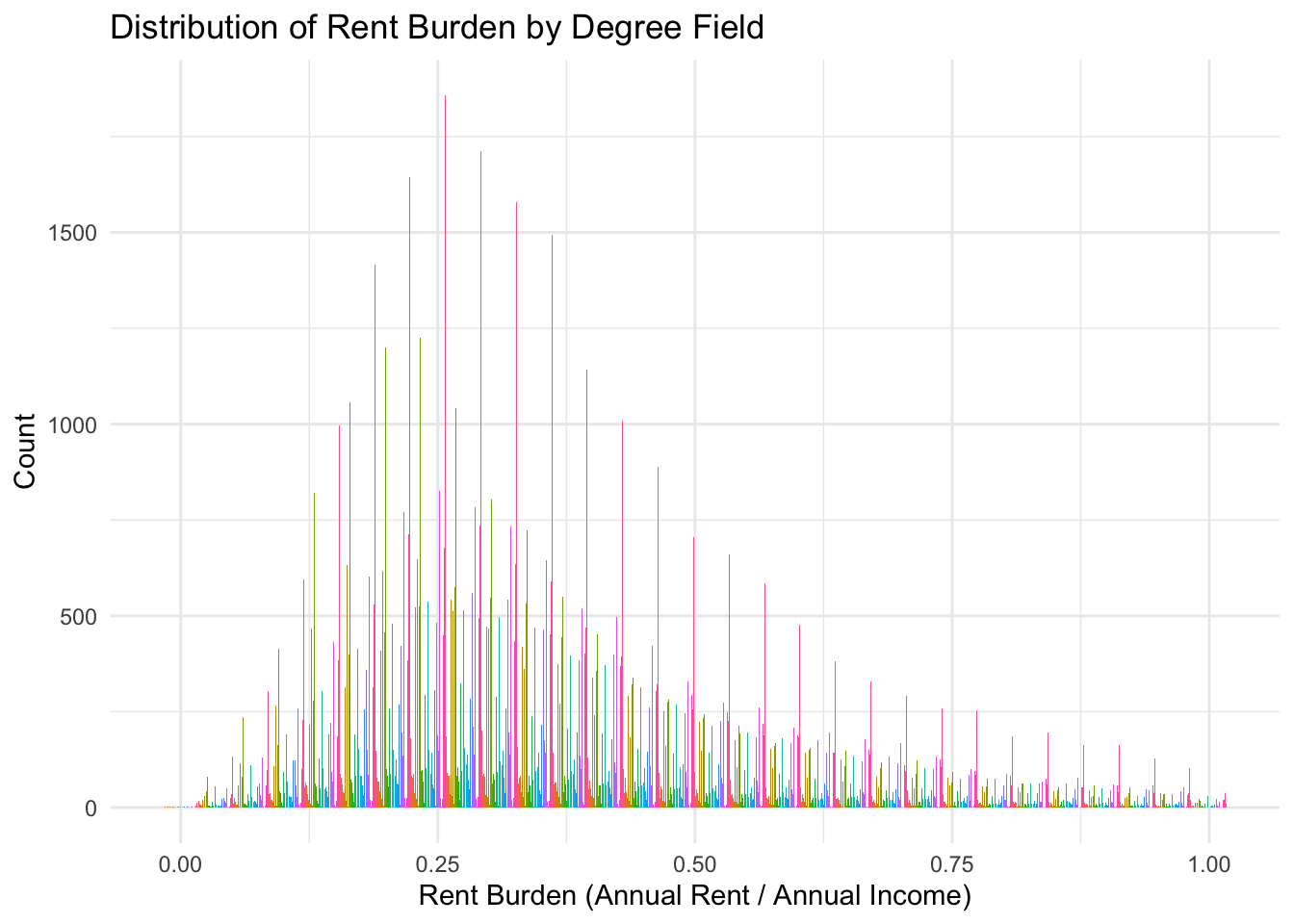
ipm |> filter(rent_burden < 1) |>
    ggplot(aes(x = rent_burden, fill = degfield)) +
    geom_histogram(bins = 30) +
    labs(
        title = "Distribution of Rent Burden by Degree Field",
        x = "Rent Burden (Annual Rent / Annual Income)",
        y = "Count"
    ) +
    facet_wrap(~degfield) +
    theme_minimal() +
theme(legend.position = "none") 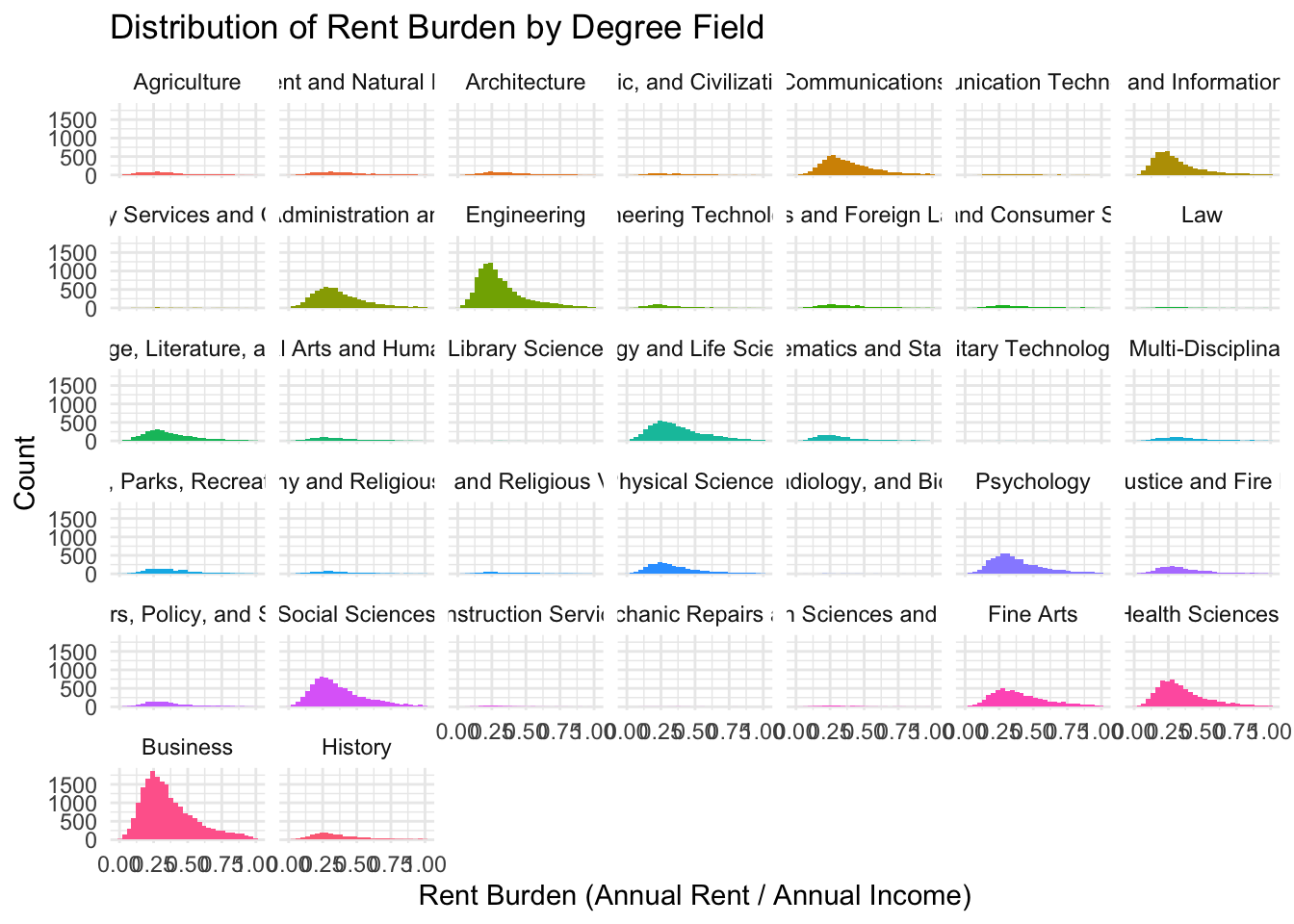
The problem with the above histogram is that it is hard to see the distribution of rent burden for each degree field because the scales are different.
count
Remember, there are multiple ways to count. Suppose we wish to count all the people with a specific degfield and rent burden category.
ipm |> count(degfield, rel_rent_burden) |>
    arrange(desc(n)) |>
    print(n = 100)
# A tibble: 111 × 3
degfield rel_rent_burden n
<fct> <chr> <int>
1 Business Low 8945
2 Business Moderate 6539
3 Engineering Low 6236
4 Business High 5986
5 Social Sciences Low 4014
6 Medical and Health Sciences and Services Low 3513
7 Computer and Information Sciences Low 3398
8 Engineering Moderate 2986
9 Social Sciences Moderate 2986
10 Social Sciences High 2731
11 Biology and Life Sciences Low 2687
12 Education Administration and Teaching Low 2643
13 Medical and Health Sciences and Services Moderate 2555
14 Engineering High 2385
15 Psychology Low 2362
16 Fine Arts High 2359
17 Education Administration and Teaching Moderate 2350
18 Communications Low 2278
19 Biology and Life Sciences Moderate 2233
20 Biology and Life Sciences High 2225
21 Psychology Moderate 2186
22 Fine Arts Moderate 2182
23 Medical and Health Sciences and Services High 2123
24 Psychology High 2120
25 Fine Arts Low 2085
26 Communications Moderate 2054
27 Education Administration and Teaching High 1986
28 Communications High 1806
29 Computer and Information Sciences Moderate 1580
30 Physical Sciences Low 1555
31 English Language, Literature, and Composition Low 1390
32 Computer and Information Sciences High 1277
33 English Language, Literature, and Composition Moderate 1162
34 Physical Sciences Moderate 1064
35 English Language, Literature, and Composition High 1040
36 Criminal Justice and Fire Protection Low 974
37 History Low 930
38 Physical Sciences High 903
39 Mathematics and Statistics Low 843
40 Criminal Justice and Fire Protection Moderate 795
41 Physical Fitness, Parks, Recreation, and Leisure Moderate 689
42 History Moderate 681
43 Public Affairs, Policy, and Social Work Low 663
44 Physical Fitness, Parks, Recreation, and Leisure Low 626
45 Criminal Justice and Fire Protection High 620
46 Physical Fitness, Parks, Recreation, and Leisure High 586
47 History High 581
48 Public Affairs, Policy, and Social Work Moderate 556
49 Liberal Arts and Humanities Low 501
50 Agriculture Low 488
51 Engineering Technologies Low 486
52 Interdisciplinary and Multi-Disciplinary Studies (Gen… Low 482
53 Linguistics and Foreign Languages Low 477
54 Interdisciplinary and Multi-Disciplinary Studies (Gen… Moderate 469
55 Public Affairs, Policy, and Social Work High 451
56 Mathematics and Statistics Moderate 450
57 Mathematics and Statistics High 421
58 Environment and Natural Resources Low 420
59 Linguistics and Foreign Languages Moderate 416
60 Environment and Natural Resources Moderate 409
61 Interdisciplinary and Multi-Disciplinary Studies (Gen… High 398
62 Liberal Arts and Humanities Moderate 389
63 Environment and Natural Resources High 384
64 Liberal Arts and Humanities High 364
65 Architecture Low 361
66 Philosophy and Religious Studies Low 360
67 Architecture Moderate 354
68 Linguistics and Foreign Languages High 353
69 Architecture High 322
70 Family and Consumer Sciences Moderate 319
71 Agriculture Moderate 304
72 Agriculture High 297
73 Family and Consumer Sciences High 294
74 Family and Consumer Sciences Low 279
75 Philosophy and Religious Studies Moderate 273
76 Philosophy and Religious Studies High 262
77 Theology and Religious Vocations Low 251
78 Theology and Religious Vocations High 217
79 Area, Ethnic, and Civilization Studies Low 208
80 Engineering Technologies Moderate 203
81 Theology and Religious Vocations Moderate 182
82 Area, Ethnic, and Civilization Studies Moderate 180
83 Area, Ethnic, and Civilization Studies High 156
84 Engineering Technologies High 137
85 Transportation Sciences and Technologies Low 137
86 Communication Technologies Moderate 131
87 Communication Technologies Low 113
88 Construction Services Low 111
89 Communication Technologies High 109
90 Transportation Sciences and Technologies Moderate 95
91 Law Low 86
92 Construction Services Moderate 73
93 Law Moderate 67
94 Transportation Sciences and Technologies High 63
95 Law High 60
96 Cosmetology Services and Culinary Arts High 59
97 Construction Services High 44
98 Cosmetology Services and Culinary Arts Moderate 37
99 Cosmetology Services and Culinary Arts Low 33
100 Nuclear, Industrial Radiology, and Biological Technol… Low 17
# ℹ 11 more rowsis the same as this
ipm |> group_by(degfield, rel_rent_burden) |>
    summarise(count = n()) |>
    arrange(desc(count)) |>
    print(n = 100)
# A tibble: 111 × 3
# Groups: degfield [37]
degfield rel_rent_burden count
<fct> <chr> <int>
1 Business Low 8945
2 Business Moderate 6539
3 Engineering Low 6236
4 Business High 5986
5 Social Sciences Low 4014
6 Medical and Health Sciences and Services Low 3513
7 Computer and Information Sciences Low 3398
8 Engineering Moderate 2986
9 Social Sciences Moderate 2986
10 Social Sciences High 2731
11 Biology and Life Sciences Low 2687
12 Education Administration and Teaching Low 2643
13 Medical and Health Sciences and Services Moderate 2555
14 Engineering High 2385
15 Psychology Low 2362
16 Fine Arts High 2359
17 Education Administration and Teaching Moderate 2350
18 Communications Low 2278
19 Biology and Life Sciences Moderate 2233
20 Biology and Life Sciences High 2225
21 Psychology Moderate 2186
22 Fine Arts Moderate 2182
23 Medical and Health Sciences and Services High 2123
24 Psychology High 2120
25 Fine Arts Low 2085
26 Communications Moderate 2054
27 Education Administration and Teaching High 1986
28 Communications High 1806
29 Computer and Information Sciences Moderate 1580
30 Physical Sciences Low 1555
31 English Language, Literature, and Composition Low 1390
32 Computer and Information Sciences High 1277
33 English Language, Literature, and Composition Moderate 1162
34 Physical Sciences Moderate 1064
35 English Language, Literature, and Composition High 1040
36 Criminal Justice and Fire Protection Low 974
37 History Low 930
38 Physical Sciences High 903
39 Mathematics and Statistics Low 843
40 Criminal Justice and Fire Protection Moderate 795
41 Physical Fitness, Parks, Recreation, and Leisure Moderate 689
42 History Moderate 681
43 Public Affairs, Policy, and Social Work Low 663
44 Physical Fitness, Parks, Recreation, and Leisure Low 626
45 Criminal Justice and Fire Protection High 620
46 Physical Fitness, Parks, Recreation, and Leisure High 586
47 History High 581
48 Public Affairs, Policy, and Social Work Moderate 556
49 Liberal Arts and Humanities Low 501
50 Agriculture Low 488
51 Engineering Technologies Low 486
52 Interdisciplinary and Multi-Disciplinary Studies (Gen… Low 482
53 Linguistics and Foreign Languages Low 477
54 Interdisciplinary and Multi-Disciplinary Studies (Gen… Moderate 469
55 Public Affairs, Policy, and Social Work High 451
56 Mathematics and Statistics Moderate 450
57 Mathematics and Statistics High 421
58 Environment and Natural Resources Low 420
59 Linguistics and Foreign Languages Moderate 416
60 Environment and Natural Resources Moderate 409
61 Interdisciplinary and Multi-Disciplinary Studies (Gen… High 398
62 Liberal Arts and Humanities Moderate 389
63 Environment and Natural Resources High 384
64 Liberal Arts and Humanities High 364
65 Architecture Low 361
66 Philosophy and Religious Studies Low 360
67 Architecture Moderate 354
68 Linguistics and Foreign Languages High 353
69 Architecture High 322
70 Family and Consumer Sciences Moderate 319
71 Agriculture Moderate 304
72 Agriculture High 297
73 Family and Consumer Sciences High 294
74 Family and Consumer Sciences Low 279
75 Philosophy and Religious Studies Moderate 273
76 Philosophy and Religious Studies High 262
77 Theology and Religious Vocations Low 251
78 Theology and Religious Vocations High 217
79 Area, Ethnic, and Civilization Studies Low 208
80 Engineering Technologies Moderate 203
81 Theology and Religious Vocations Moderate 182
82 Area, Ethnic, and Civilization Studies Moderate 180
83 Area, Ethnic, and Civilization Studies High 156
84 Engineering Technologies High 137
85 Transportation Sciences and Technologies Low 137
86 Communication Technologies Moderate 131
87 Communication Technologies Low 113
88 Construction Services Low 111
89 Communication Technologies High 109
90 Transportation Sciences and Technologies Moderate 95
91 Law Low 86
92 Construction Services Moderate 73
93 Law Moderate 67
94 Transportation Sciences and Technologies High 63
95 Law High 60
96 Cosmetology Services and Culinary Arts High 59
97 Construction Services High 44
98 Cosmetology Services and Culinary Arts Moderate 37
99 Cosmetology Services and Culinary Arts Low 33
100 Nuclear, Industrial Radiology, and Biological Technol… Low 17
# ℹ 11 more rowsproportions
What proportion of each degfield is in each rent burden category?
rent_cat <- ipm |> group_by(degfield, rel_rent_burden) |>
    summarise(count = n()) |>
    mutate(prop = count / sum(count)) |>
    arrange(desc(prop))

rent_cat |> filter(rel_rent_burden == 'High') |> arrange(desc(prop)) |>
    print(n = 100)
# A tibble: 37 × 4
# Groups: degfield [37]
degfield rel_rent_burden count prop
<fct> <chr> <int> <dbl>
1 Cosmetology Services and Culinary Arts High 59 0.457
2 Military Technologies High 6 0.429
3 Fine Arts High 2359 0.356
4 Theology and Religious Vocations High 217 0.334
5 Family and Consumer Sciences High 294 0.330
6 Psychology High 2120 0.318
7 Environment and Natural Resources High 384 0.317
8 Biology and Life Sciences High 2225 0.311
9 Architecture High 322 0.311
10 Communication Technologies High 109 0.309
11 Physical Fitness, Parks, Recreation, and Leisure High 586 0.308
12 Interdisciplinary and Multi-Disciplinary Studies… High 398 0.295
13 Communications High 1806 0.294
14 Philosophy and Religious Studies High 262 0.293
15 Liberal Arts and Humanities High 364 0.290
16 English Language, Literature, and Composition High 1040 0.290
17 Area, Ethnic, and Civilization Studies High 156 0.287
18 Education Administration and Teaching High 1986 0.285
19 Linguistics and Foreign Languages High 353 0.283
20 Law High 60 0.282
21 Social Sciences High 2731 0.281
22 Business High 5986 0.279
23 Agriculture High 297 0.273
24 Public Affairs, Policy, and Social Work High 451 0.270
25 Electrical and Mechanic Repairs and Technologies High 8 0.267
26 History High 581 0.265
27 Criminal Justice and Fire Protection High 620 0.260
28 Medical and Health Sciences and Services High 2123 0.259
29 Physical Sciences High 903 0.256
30 Mathematics and Statistics High 421 0.246
31 Transportation Sciences and Technologies High 63 0.214
32 Engineering High 2385 0.205
33 Computer and Information Sciences High 1277 0.204
34 Construction Services High 44 0.193
35 Nuclear, Industrial Radiology, and Biological Te… High 7 0.184
36 Library Science High 4 0.167
37 Engineering Technologies High 137 0.166scatterplots
The example below shows a scatterplot of rent burden by degfield. It is poor. Why?
ipm |> filter(rent_burden < 10) |>
    ggplot(aes(x = rent_burden, y = reorder(degfield,scale_rent_burden))) +
    geom_vline(xintercept = 0.3, linetype = "dashed", color = "red") +
    geom_point() +
    scale_fill_manual(values = c("Low" = "green", "Moderate" = "yellow", "High" = "red")) +
    labs(
        title = "Divergent Bar Graph of Rent Burden",
        x = "Rent Burden (Annual Rent / Annual Income) - 0.3",
        y = "Count",
        fill = "Rent Burden Category"
    ) +
    theme_minimal()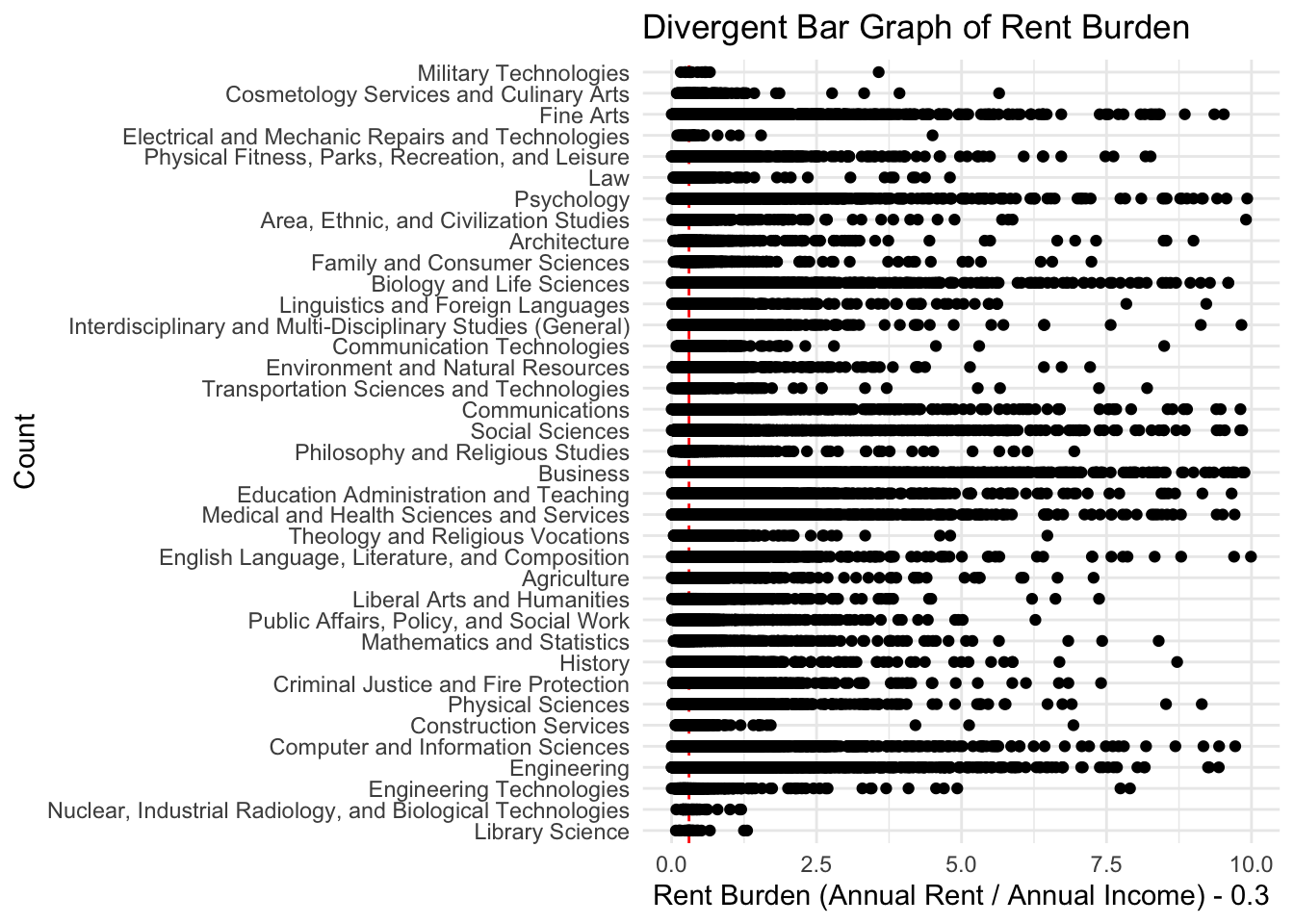
Get a sense of the distribution of rent burden. That is, how many people are in each category of rent burden, and
ipm |> relocate(rent_burden) |>
    arrange(desc(rent_burden)) |>
    head(100) |>
    print(n=100)
# A tibble: 100 × 15
rent_burden year insign rentgrs pernum sex age race degfield uhrswork
<dbl> <int> <chr> <int+lb> <dbl> <fct> <int> <fct> <fct> <int+lb>
1 8550 2024 Valid 2850 1 Male 51 White Business 50
2 6360 2024 Valid 2120 1 Male 30 White Biology… 40
3 6312 2024 Valid 2104 1 Male 59 White History 40
4 5700 2024 Valid 1900 2 Fema… 45 Blac… Psychol… 40
5 4740 2024 Valid 1580 2 Fema… 28 White Social … 40
6 2702. 2024 Valid 2252 1 Fema… 26 White Physica… 45
7 1620 2024 Valid 2700 2 Male 35 Blac… Fine Ar… 40
8 1440 2024 Valid 1200 1 Fema… 28 Two … Medical… 40
9 1327. 2024 Valid 2212 1 Male 40 White Business 40
10 1027. 2024 Valid 3423 1 Male 33 White Medical… 40
11 1020 2024 Valid 1700 1 Male 33 Blac… Compute… 60
12 1002 2024 Valid 1670 1 Fema… 42 Othe… Psychol… 36
13 892. 2024 Valid 2972 1 Fema… 32 White Communi… 40
14 879 2024 Valid 2930 1 Male 25 White Psychol… 40
15 540 2024 Valid 1800 1 Fema… 31 White Law 35
16 468 2024 Valid 1950 1 Fema… 29 White Business 40
17 396. 2024 Valid 3297 1 Fema… 43 White Psychol… 40
18 352 2024 Valid 1760 1 Fema… 36 Othe… Fine Ar… 60
19 323 2024 Valid 3230 3 Fema… 25 Two … Medical… 40
20 230. 2024 Valid 2870 1 Male 36 White Social … 40
21 183. 2024 Valid 3817 2 Fema… 39 White Educati… 40
22 181. 2024 Valid 1505 1 Male 39 White Agricul… 60
23 157. 2024 Valid 5248 3 Male 30 White Compute… 40
24 130. 2024 Valid 2810 1 Fema… 27 White Biology… 36
25 126. 2024 Valid 2621 2 Fema… 38 White Linguis… 40
26 117. 2024 Valid 1270 2 Fema… 27 Two … Psychol… 55
27 116. 2024 Valid 2898 3 Fema… 22 Two … Crimina… 40
28 114. 2024 Valid 858 1 Male 48 White Business 60
29 107. 2024 Valid 1247 1 Male 36 Two … Compute… 40
30 95.6 2024 Valid 5100 5 Fema… 43 White Social … 40
31 92 2024 Valid 1150 1 Fema… 30 White Fine Ar… 40
32 90.7 2024 Valid 3780 5 Fema… 23 Othe… Compute… 45
33 85.3 2024 Valid 3555 1 Fema… 27 White Interdi… 40
34 85.3 2024 Valid 1777 2 Fema… 45 Othe… Fine Ar… 50
35 82.9 2024 Valid 1382 2 Male 37 Othe… Enginee… 40
36 78.4 2024 Valid 5878 1 Fema… 24 White Educati… 40
37 73.7 2024 Valid 4605 1 Fema… 37 Othe… Business 40
38 68.4 2024 Valid 3648 3 Fema… 23 Othe… Biology… 40
39 67.0 2024 Valid 5580 4 Male 22 Chin… Physica… 40
40 66.8 2024 Valid 2060 1 Fema… 48 Othe… Social … 40
41 64.9 2024 Valid 1483 1 Fema… 49 White Business 60
42 63.4 2024 Valid 1057 2 Male 49 White Communi… 40
43 59.5 2024 Valid 2480 1 Fema… 26 White Social … 40
44 58.6 2024 Valid 4880 1 Fema… 22 Two … Medical… 36
45 58.5 2024 Valid 3410 2 Fema… 28 Two … Business 40
46 58.4 2024 Valid 2094 2 Fema… 28 White Biology… 40
47 57.8 2024 Valid 2890 2 Fema… 25 White Medical… 40
48 55.7 2024 Valid 2553 3 Male 51 White Communi… 36
49 55.4 2024 Valid 2908 1 Fema… 33 White Educati… 40
50 54.6 2024 Valid 2730 3 Fema… 24 White Fine Ar… 40
51 54.4 2024 Valid 1360 2 Fema… 33 Othe… Social … 40
52 53.9 2024 Valid 5618 2 Fema… 43 Othe… Educati… 40
53 53.1 2024 Valid 2744 1 Male 22 White Business 40
54 52.8 2024 Valid 2858 2 Fema… 36 White Medical… 36
55 52.6 2024 Valid 1315 2 Fema… 26 White Medical… 40
56 52.5 2024 Valid 1750 1 Male 23 Two … Business 40
57 51.8 2024 Valid 2160 1 Male 37 Two … Business 50
58 51.8 2024 Valid 1725 2 Male 21 Othe… Enginee… 40
59 48.1 2024 Valid 4408 2 Fema… 35 White Medical… 45
60 47.3 2024 Valid 1300 1 Fema… 30 Amer… Biology… 40
61 46.6 2024 Valid 2950 2 Fema… 28 Othe… Compute… 40
62 46.6 2024 Valid 3220 2 Male 51 Othe… Medical… 40
63 45.6 2024 Valid 2280 3 Fema… 23 Othe… Communi… 55
64 45.3 2024 Valid 1360 1 Fema… 45 White Crimina… 40
65 44.4 2024 Valid 2000 1 Fema… 47 White Medical… 41
66 43.6 2024 Valid 2180 2 Male 29 Othe… Enginee… 45
67 41.9 2024 Valid 3490 4 Male 22 Chin… Enginee… 40
68 41.1 2024 Valid 2636 1 Fema… 31 White Business 40
69 39.4 2024 Valid 9200 1 Male 62 White Business 50
70 39.3 2024 Valid 1770 1 Fema… 51 White Communi… 41
71 38.8 2024 Valid 1940 2 Fema… 23 Othe… Compute… 55
72 38.6 2024 Valid 933 1 Fema… 23 Two … Medical… 37
73 38.5 2024 Valid 770 1 Male 58 Blac… Enginee… 40
74 38.4 2024 Valid 3200 2 Fema… 30 Othe… Family … 40
75 38.4 2024 Valid 1600 1 Fema… 23 White Educati… 40
76 38.2 2024 Valid 7000 1 Male 23 Chin… Social … 35
77 38 2024 Valid 1900 2 Fema… 22 Othe… Crimina… 55
78 37.8 2024 Valid 4100 2 Male 36 White Business 40
79 37.0 2024 Valid 1543 2 Male 27 Blac… Physica… 45
80 36.9 2024 Valid 3686 5 Fema… 40 Othe… English… 40
81 36.9 2024 Valid 1290 2 Fema… 46 Two … Business 60
82 36.8 2024 Valid 1930 3 Male 27 Two … Business 37
83 36.5 2024 Valid 3040 2 Male 39 Blac… Business 50
84 36.3 2024 Valid 7087 2 Male 42 Two … Fine Ar… 40
85 36.3 2024 Valid 4239 2 Fema… 54 Amer… Compute… 40
86 36.3 2024 Valid 1513 1 Fema… 59 White Fine Ar… 40
87 35.7 2024 Valid 1220 2 Fema… 41 White Business 40
88 35.3 2024 Valid 2940 3 Male 24 Two … Psychol… 40
89 35.0 2024 Valid 1457 5 Male 22 White Compute… 40
90 34.9 2024 Valid 4950 3 Fema… 44 Othe… Business 45
91 34.9 2024 Valid 843 1 Fema… 25 White Agricul… 35
92 34.8 2024 Valid 1450 1 Fema… 22 White Enginee… 40
93 34.8 2024 Valid 2754 2 Male 24 Othe… Compute… 40
94 34.4 2024 Valid 3435 2 Male 22 White Enginee… 35
95 34.1 2024 Valid 1565 2 Male 68 Blac… Social … 35
96 33.6 2024 Valid 2800 2 Male 31 Othe… History 40
97 33.4 2024 Valid 1755 2 Male 29 White Biology… 37
98 33.4 2024 Valid 3620 3 Male 22 Othe… Mathema… 50
99 32.7 2024 Valid 4090 1 Fema… 29 White Biology… 50
100 31.8 2024 Valid 2654 1 Fema… 35 Two … Fine Ar… 45
# ℹ 5 more variables: inctot <dbl+lbl>, tranwork <fct>, trantime <dbl+lbl>,
# rel_rent_burden <chr>, scale_rent_burden <dbl>There is too much data for that chart to be useful. Let’s look at the distribution of the people across the rent burden categories. We can do this with a histogram.
ipm |> ggplot(
    aes(x=rent_burden, fill = rel_rent_burden)) +
    geom_histogram(bins = 30)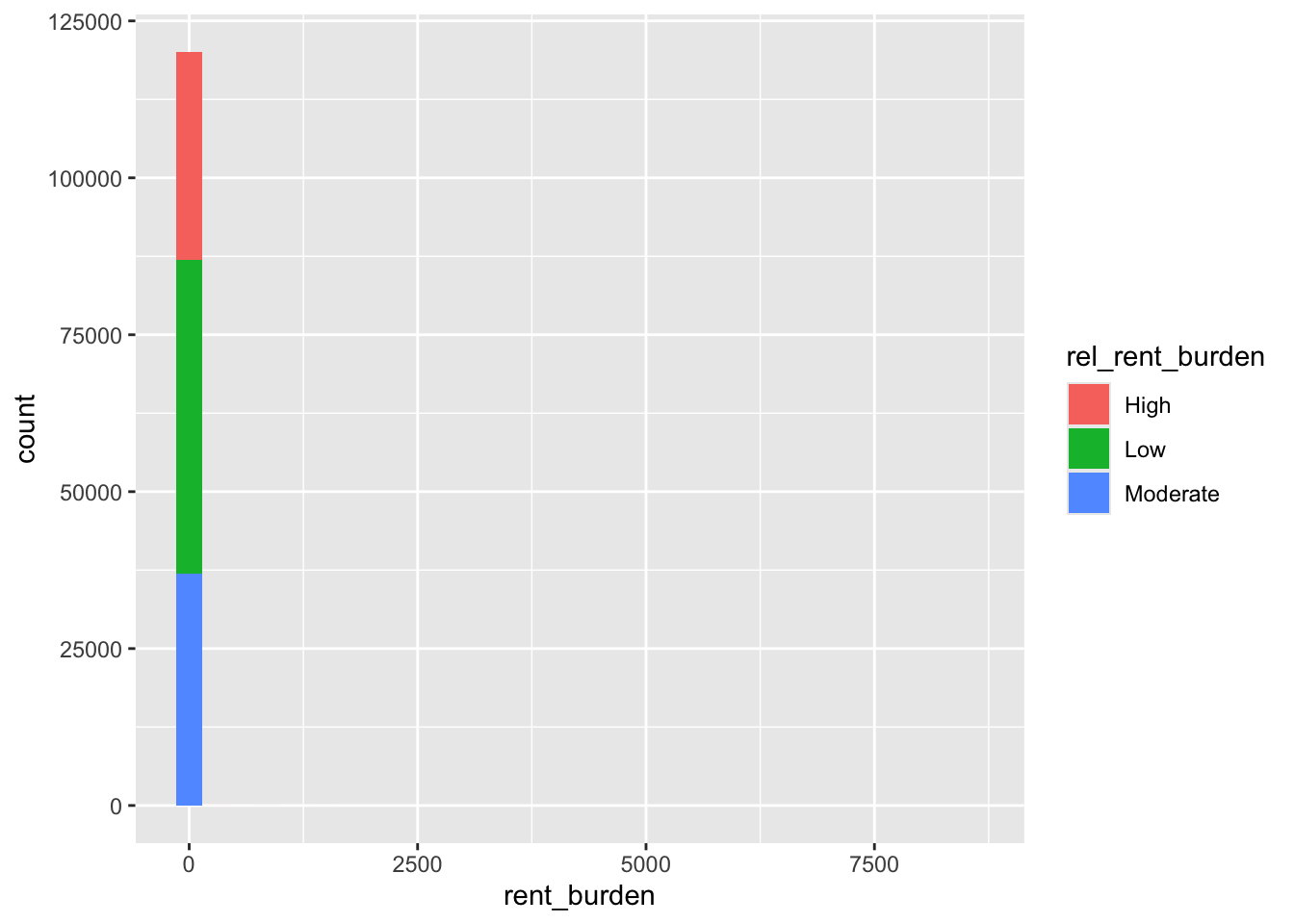
or a barchart
ipm |> ggplot(
    aes(x=rel_rent_burden, fill = rel_rent_burden)) +
    geom_bar()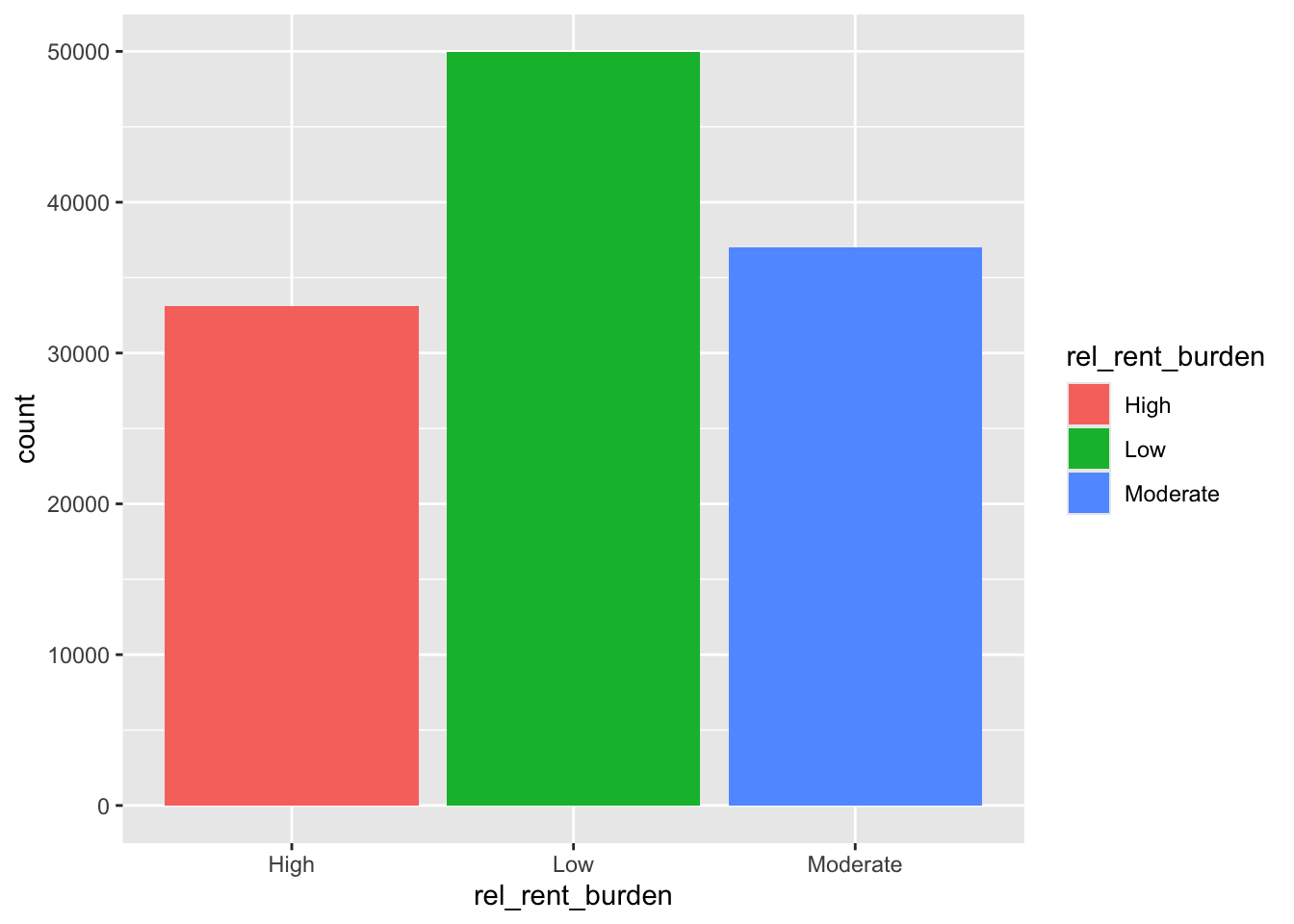
ipm |> filter(rent_burden < 1) |>
    ggplot(aes(x = rent_burden)) +
    geom_histogram(bins = 30) +
    labs(
        title = "Distribution of Rent Burden",
        x = "Rent Burden (Annual Rent / Annual Income)",
        y = "Count"
    ) +
    theme_minimal()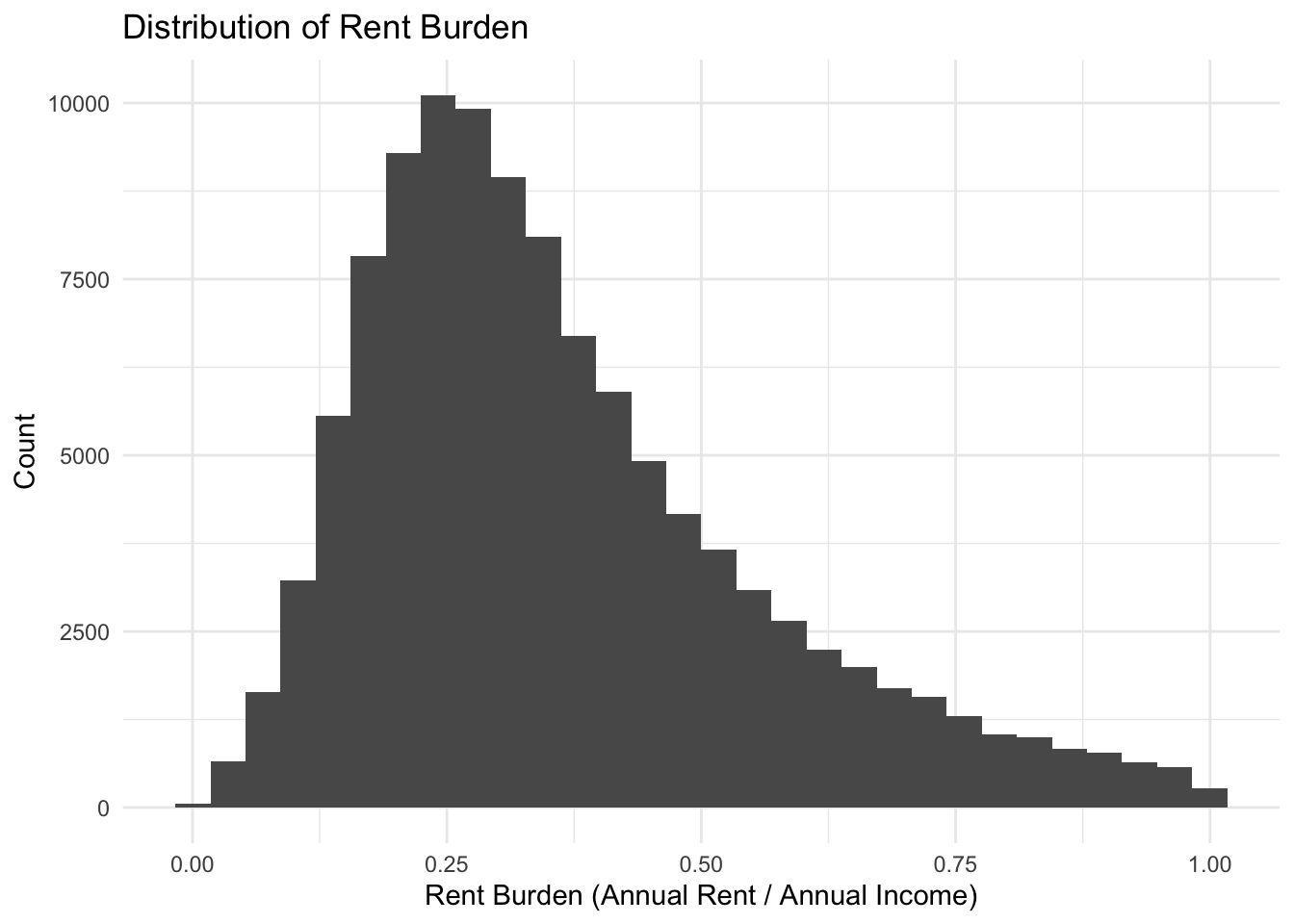
summarize rent_burden by degfield
rent_sum <- ipm |> group_by(degfield) |>
    summarise(
        mean_rent_burden = mean(rent_burden, na.rm = TRUE),
        median_rent_burden = median(rent_burden, na.rm = TRUE),
        count = n()
    ) |>
    mutate(
        degfield = fct_reorder(degfield, median_rent_burden)
    )  |>
    arrange(desc(degfield))
visualize rent_burden summary by degfield
rent_sum |> ggplot(
    aes(y = reorder(degfield, median_rent_burden), x = median_rent_burden, fill = degfield)) +
    geom_col()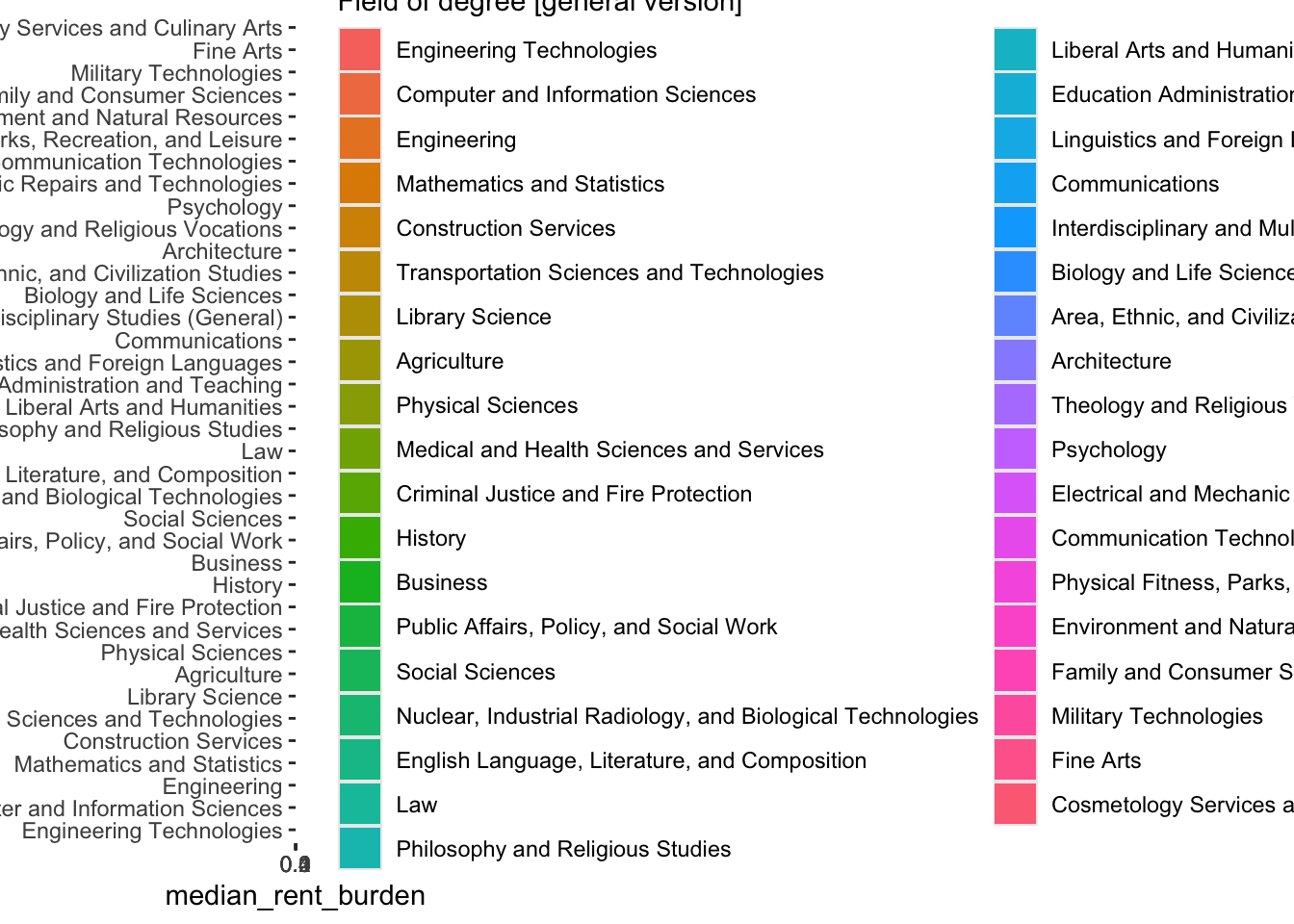
lollipop graph of rent_burden summary by degfield
rent_sum |> ggplot(
    aes(y = degfield, x = median_rent_burden)) +
    geom_segment(aes(x = 0, xend = median_rent_burden, y = degfield, yend = degfield), color = "grey") +
    geom_point(aes(color = degfield),size = 4) +
    labs(
        title = "Median Rent Burden by Degree Field",
        x = "Median Rent Burden (Annual Rent / Annual Income)",
        y = "Degree Field"
    ) +
    theme_minimal() +
    theme(legend.position = "none")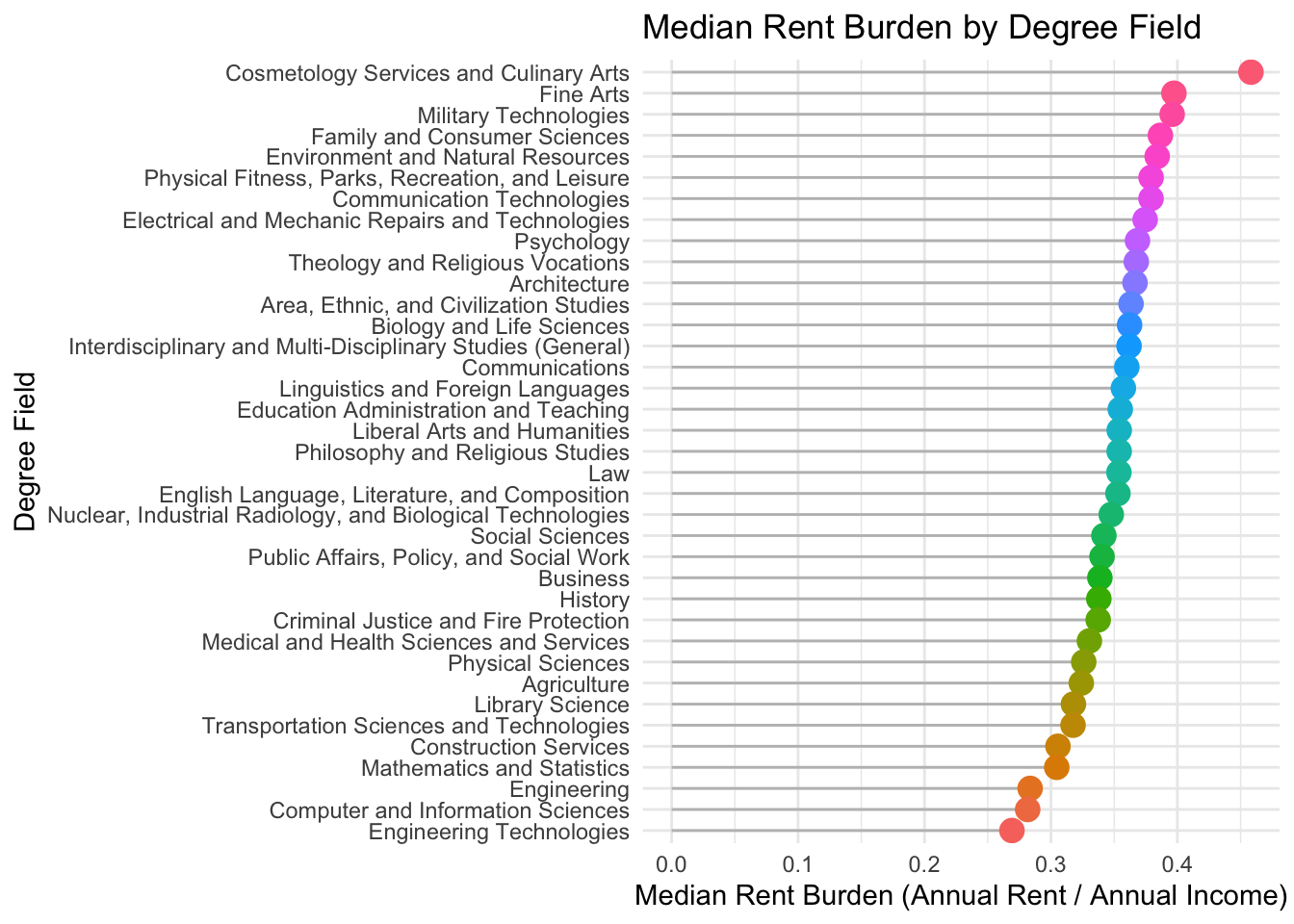
rent_race_sum <- ipm |> group_by(degfield,sex) |>
    summarise(
        mean_rent_burden = mean(rent_burden, na.rm = TRUE),
        median_rent_burden = median(rent_burden, na.rm = TRUE),
        count = n()
    ) |>
    mutate(
        degfield = fct_reorder(degfield, median_rent_burden)
    )  |>
    arrange(desc(degfield))

rent_race_sum |> ggplot(
    aes(y = degfield, x = median_rent_burden)) +
    geom_segment(aes(x = 0, xend = median_rent_burden, y = degfield, yend = degfield), color = "grey") +
    geom_point(aes(color = degfield),size = 4) +
    labs(
        title = "Median Rent Burden by Degree Field",
        x = "Median Rent Burden (Annual Rent / Annual Income)",
        y = "Degree Field"
    ) +
    theme_minimal() +
    theme(legend.position = "none") +
    facet_wrap(~sex)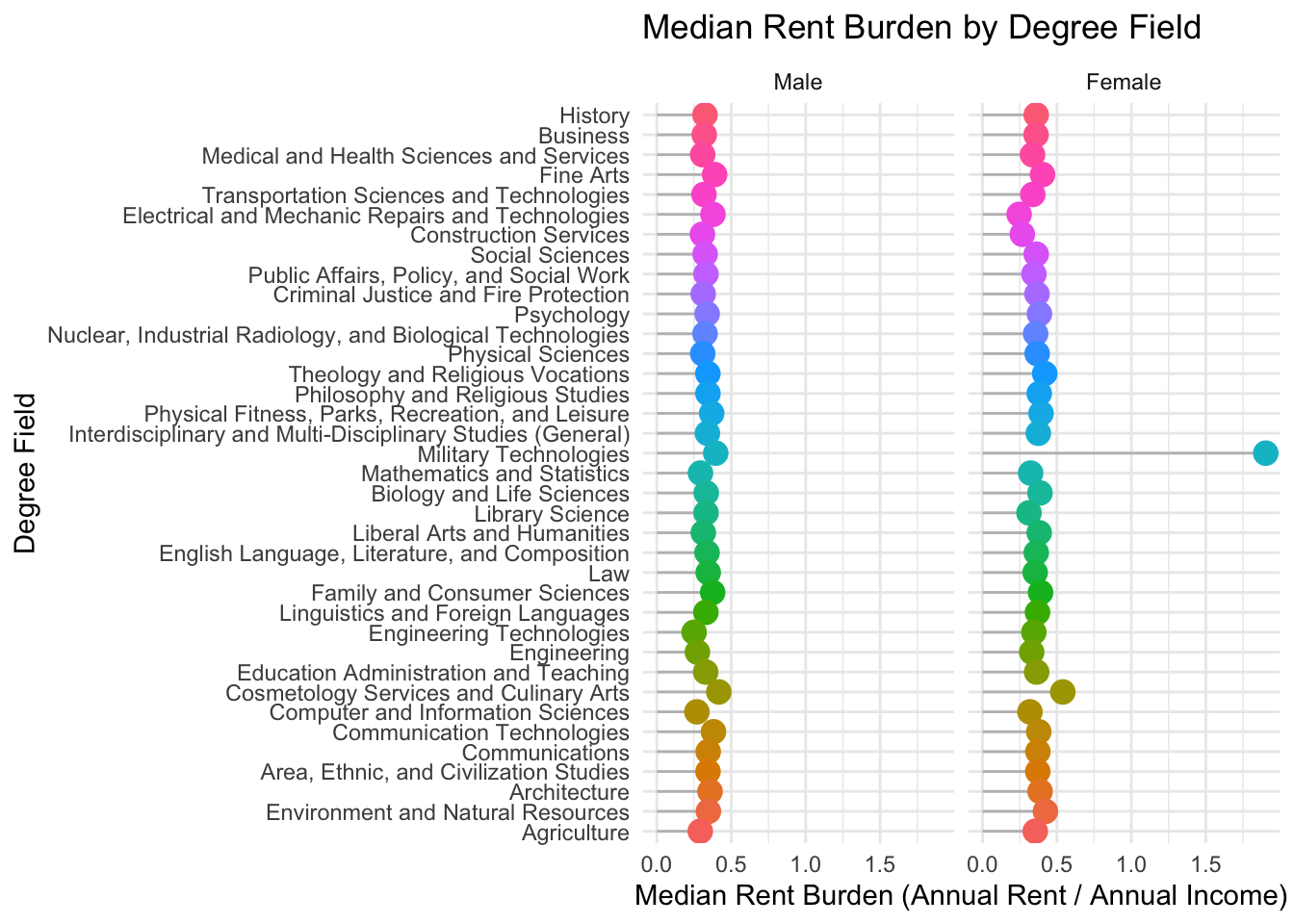
divergent bar graph of rent burden by degfield and sex
rent_race_sum |>
    mutate(
        median_rent_burden =
            ifelse(sex == "Male",
                   -median_rent_burden,
                    median_rent_burden)
    ) |>
    ggplot(aes(x = median_rent_burden, y = degfield, fill = sex)) +
    geom_bar(stat = "identity") +
    geom_vline(xintercept = 0.3, linetype = "dashed", color = "red") +
    geom_vline(xintercept = -0.3, linetype = "dashed", color = "red") +
    scale_x_continuous(labels = abs) +
    labs(
        title = "Divergent Bar Graph of Median Rent Burden by Degree Field and Sex",
        x = "Median Rent Burden (Annual Rent / Annual Income)",
        y = "Degree Field",
        fill = "Sex"
    ) +
    theme_minimal()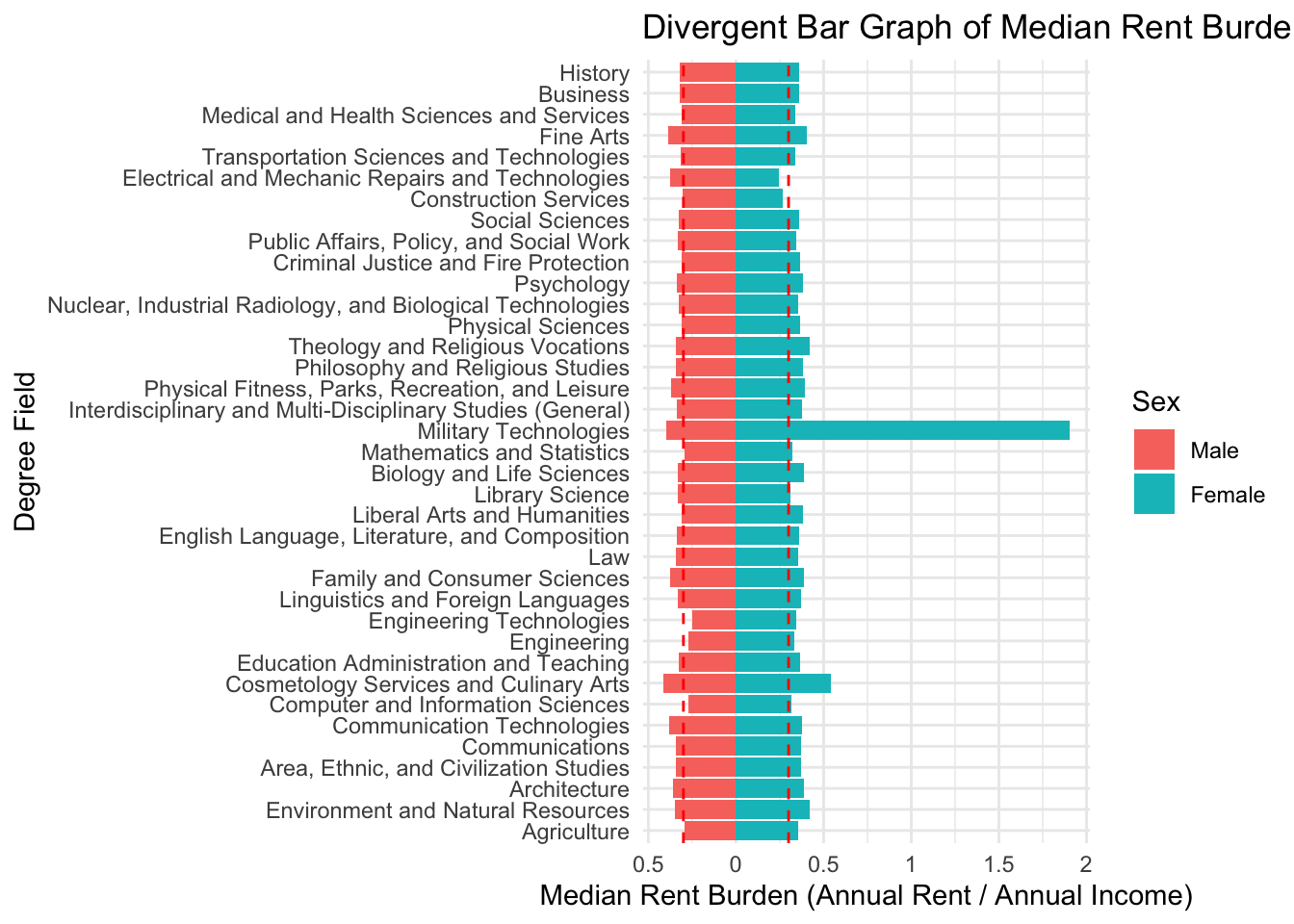
# year 2006
ipums_2006 <- read_rds('https://euclid.nmu.edu/~joshthom/dat309/data/IPUMS/ipums_2006.rds')

# year 2016
ipums_2016 <- read_rds('https://euclid.nmu.edu/~joshthom/dat309/data/IPUMS/ipums_2016.rds')

# year 2024
ipums_2024 <- read_rds('https://euclid.nmu.edu/~joshthom/dat309/data/IPUMS/ipums_2024.rds')
ipums_all <- left_join(ipums_2006,ipums_2016) ipums_all <- left_join(ipums_all,ipums_2024) write_rds(ipums_all, ‘../data/IPUMS/ipums_full.rds’)