library(tidyverse)
# install gifski and av
# install.packages("gifski")
# install.packages("av")
# install.packages("gganimate")
library(gganimate)
library(gifski)
library(av)Simple Animated Plots
Visual Global Climate Events & Economic Impact with Animations
As usual, we’ll use the tidyverse but also some new packages that you will have to install. Uncomment the lines below if you don’t already have them installed.
We use this data from Kaggle. From the website -
This comprehensive dataset tracks major climate events worldwide and their economic impact from 2020 to September 2025. With over 3,000 documented events across 51 countries, this dataset provides crucial insights into the increasing frequency and severity of climate-related disasters and their economic consequences.
gce <- read_csv("https://euclid.nmu.edu/~joshthom/dat309/data/climate/global_climate_events_economic_impact_2020_2025.csv")

glimpse(gce)
Rows: 3,000
Columns: 20
$ event_id <chr> "EV01539", "EV02303", "EV01796", "EV0017…
$ date <date> 2020-01-01, 2020-01-01, 2020-01-02, 202…
$ year <dbl> 2020, 2020, 2020, 2020, 2020, 2020, 2020…
$ month <dbl> 1, 1, 1, 1, 1, 1, 1, 1, 1, 1, 1, 1, 1, 1…
$ country <chr> "Japan", "Qatar", "Canada", "Poland", "U…
$ event_type <chr> "Tsunami", "Hurricane", "Drought", "Heat…
$ severity <dbl> 1, 1, 3, 6, 4, 3, 3, 4, 1, 4, 1, 4, 5, 6…
$ duration_days <dbl> 1, 4, 6, 16, 16, 72, 2, 1, 1, 1, 7, 1, 5…
$ affected_population <dbl> 420956, 3276, 120382, 185527, 176642, 24…
$ deaths <dbl> 0, 1, 0, 2, 2, 1, 0, 1, 0, 3, 0, 0, 2, 1…
$ injuries <dbl> 2, 10, 9, 37, 27, 15, 14, 19, 7, 30, 4, …
$ economic_impact_million_usd <dbl> 0.01, 0.00, 0.10, 1.27, 2.01, 0.63, 0.77…
$ infrastructure_damage_score <dbl> 4.9, 3.4, 8.9, 17.8, 18.7, 5.4, 12.3, 11…
$ response_time_hours <dbl> 11, 5, 10, 7, 17, 2, 8, 8, 30, 5, 6, 8, …
$ international_aid_million_usd <dbl> 0, 0, 0, 0, 0, 0, 0, 0, 0, 0, 0, 0, 0, 0…
$ latitude <dbl> 85.4321, -32.0370, 78.4213, 73.6564, 52.…
$ longitude <dbl> 138.7206, 14.0111, -112.7556, 115.0650, …
$ total_casualties <dbl> 2, 11, 9, 39, 29, 16, 14, 20, 7, 33, 4, …
$ impact_per_capita <dbl> 0.02, 0.00, 0.83, 6.85, 11.38, 2.56, 0.1…
$ aid_percentage <dbl> 0, 0, 0, 0, 0, 0, 0, 0, 0, 0, 0, 0, 0, 0…An initial barplot
Before you animate, make a static plot.
Remember what barplots tell you: they show the frequency or magnitude of a variable for each category.
# notice the fill = country
ggplot(gce, aes(y = country, fill = country)) +
  geom_bar() +
  theme(legend.position = "none") +
  labs(title = 'Number of Climate Events by Country')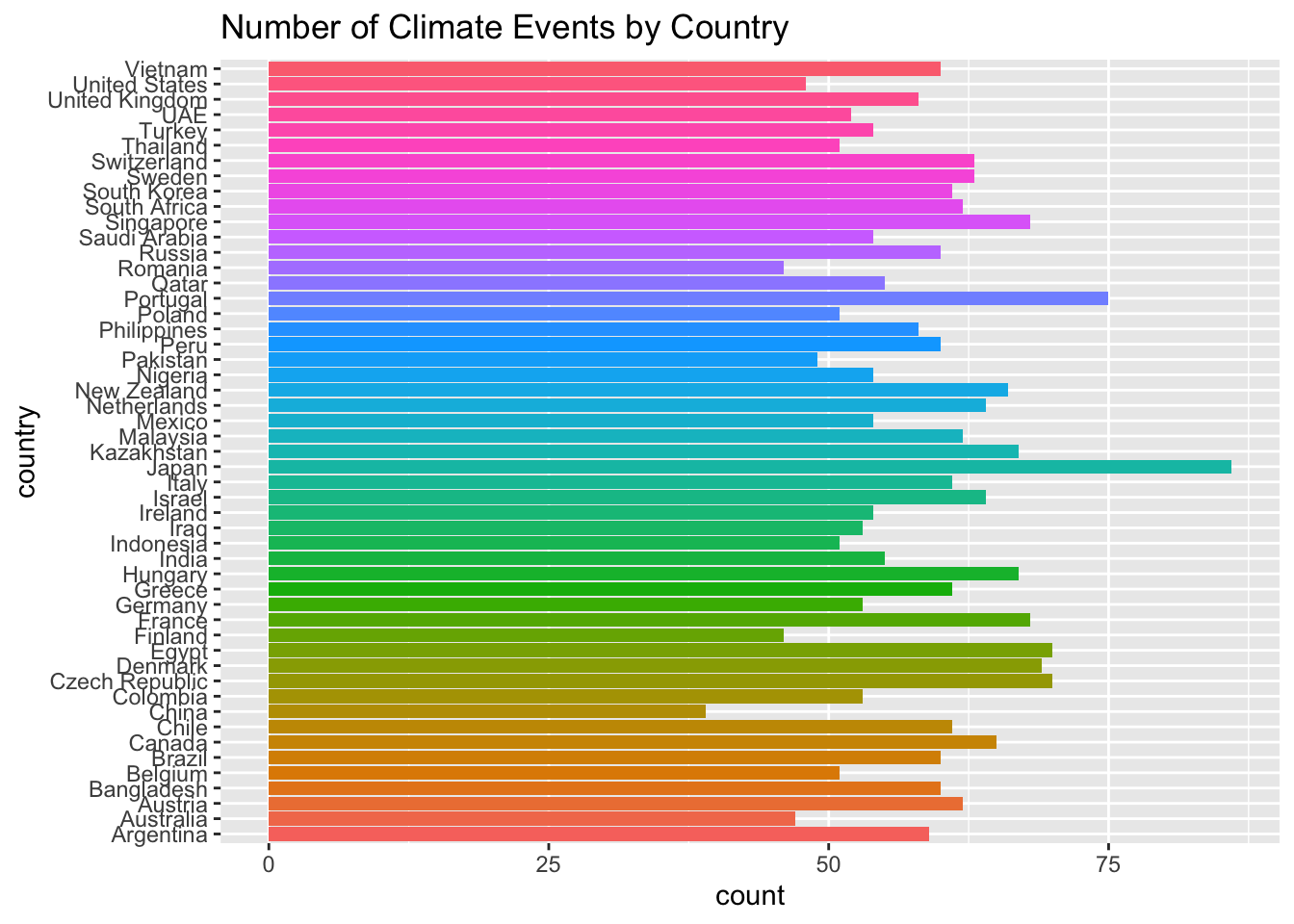
Reorder & change to a lollipop plot
Read here for more.
To reorder, either use reorder() or fct_reorder(). The former is a base R function, the latter is from the forcats package (which is part of the tidyverse). Both work.
This is a plot of the full dataset.
# create the variable n, which is a count of the number of events per country.  Then reorder the country variable by n.
events_per_country <- count(gce,country) |>
  mutate(country = reorder(country,n))

events_per_country |> head()
# A tibble: 6 × 2
country n
<fct> <int>
1 Argentina 59
2 Australia 47
3 Austria 62
4 Bangladesh 60
5 Belgium 51
6 Brazil 60events_per_country |>
ggplot(aes(y = country, x = n)) +
# lollipop recipe
geom_segment(aes(x=0, xend=n, y=country, yend=country)) +
geom_point(aes(color=country)) +
theme_minimal() +
theme(legend.position = "none")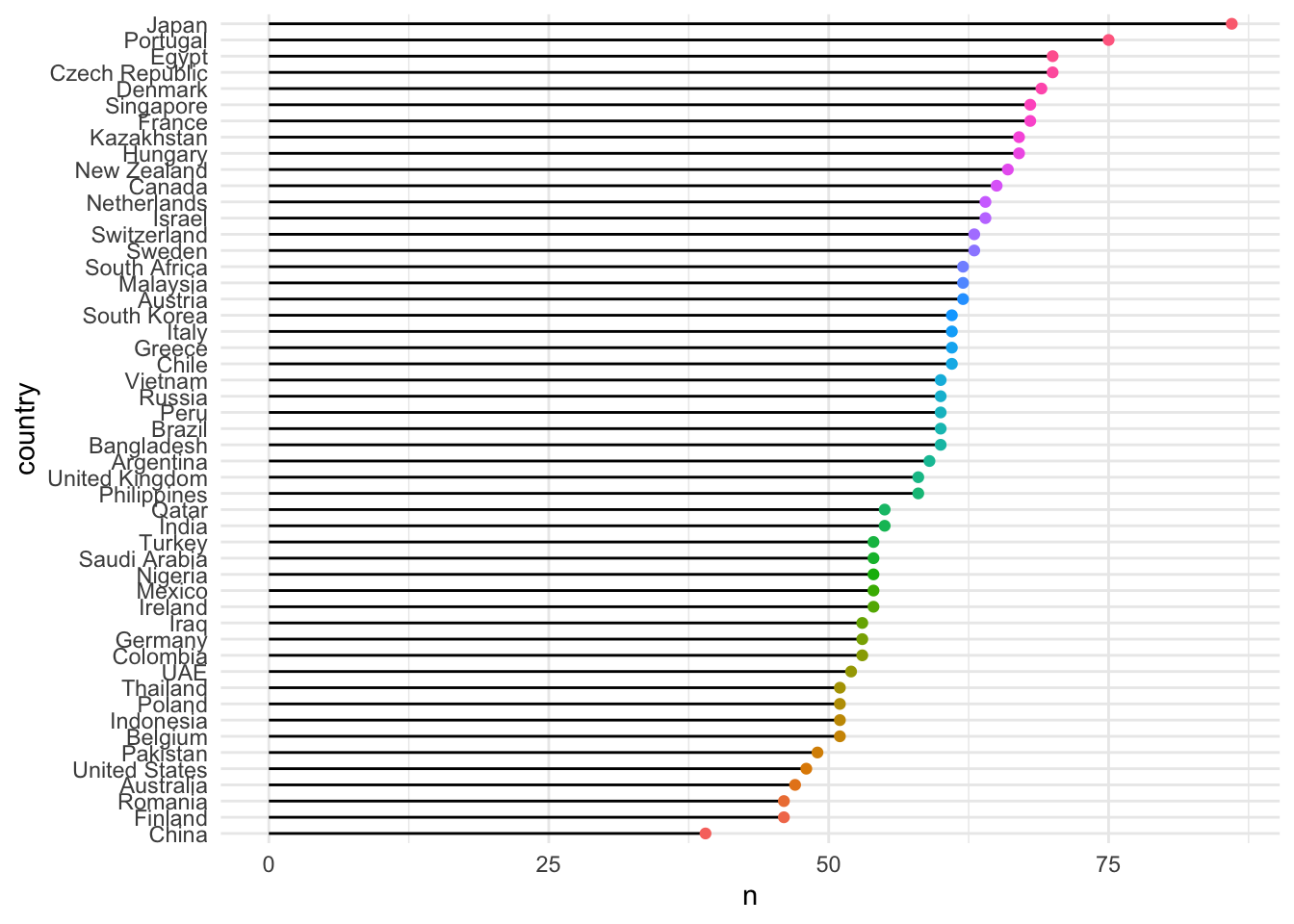
Filter to just one year
Our animation will be over the years, so let’s filter to just one year to see what the plot looks like. We’ll use 2020.
events_per_country <- filter(gce,year == 2020) |>
  count(country) |>
  mutate(country = reorder(country,n))

events_per_country |>
  ggplot(aes(y = country, x = n)) +
  geom_segment(aes(x=0, xend=n, y=country, yend=country)) +
  geom_point(aes(color=country)) +
  theme_minimal() +
  theme(legend.position = "none")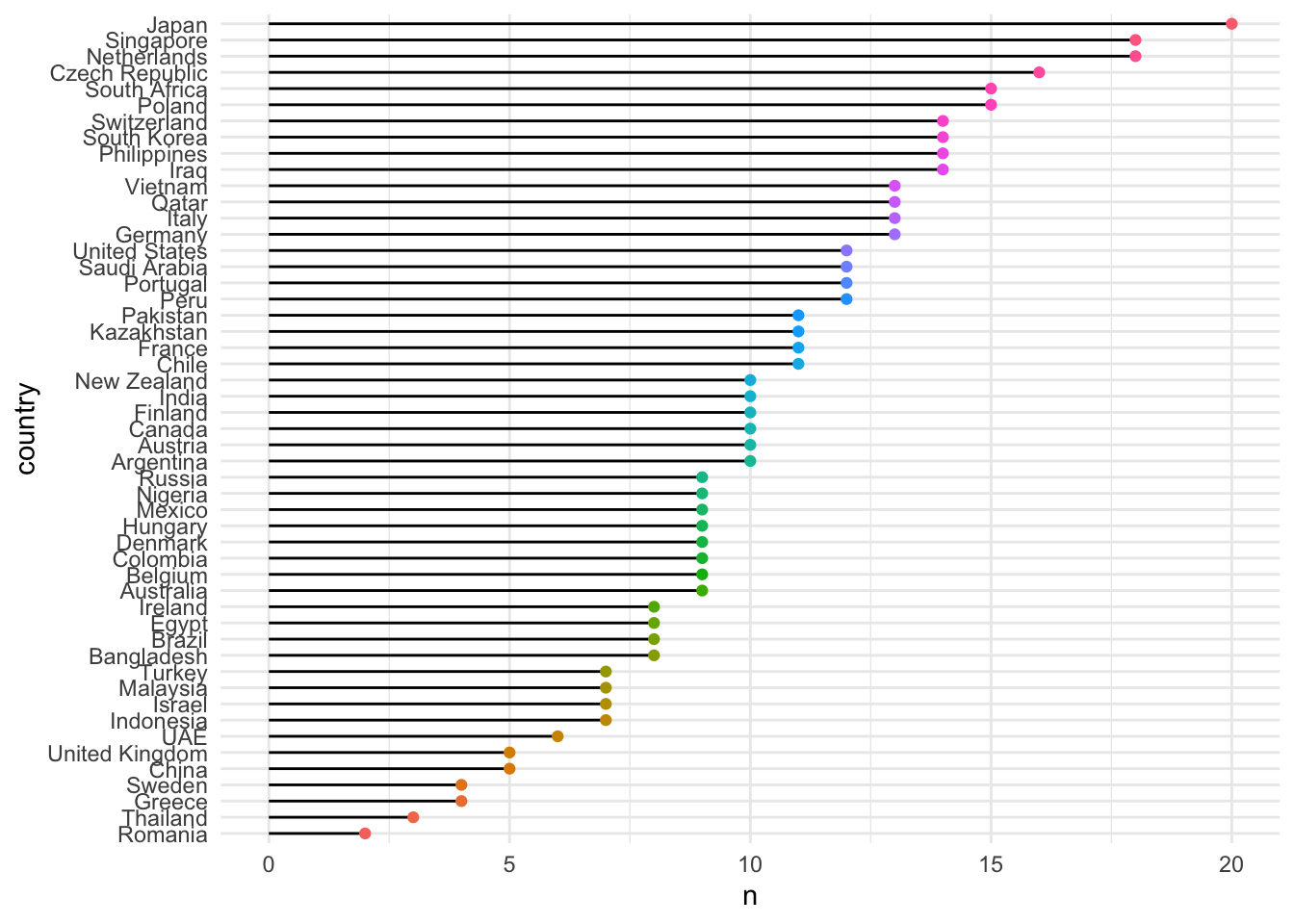
Animate over a variable
Finally, we animate over the years. The animation will show the number of events per country for each year. The animation will transition from one year to the next.
# count below is equivalent to: group_by() |> summarize(n=n())
events_per_country <- count(gce,country,year) |>
  mutate(country = reorder(country,n))

p_country <- events_per_country |>
  ggplot(aes(y = country, x = n)) +
  geom_segment(aes(x=0, xend=n, y=country, yend=country)) +
  geom_point(aes(color=country)) +
  theme_minimal() +
  theme(legend.position = "none") +
  #
  # the animation steps are below.
  #
  transition_states(states=year, # year is a variable in data
                    transition_length = 1, # how long to transition between states
                    state_length = 10) + # how long to hold each state
  enter_fade() +  # how to enter a new state
  exit_fade() + # how to exit a state
  ease_aes('linear') + # how to ease the transition
  labs(title = "Year: {closest_state}", # closest_state is a special variable that gganimate uses to display the current state
       y = "Country", x = "Number of Events")

animate(p_country, renderer = gifski_renderer()) 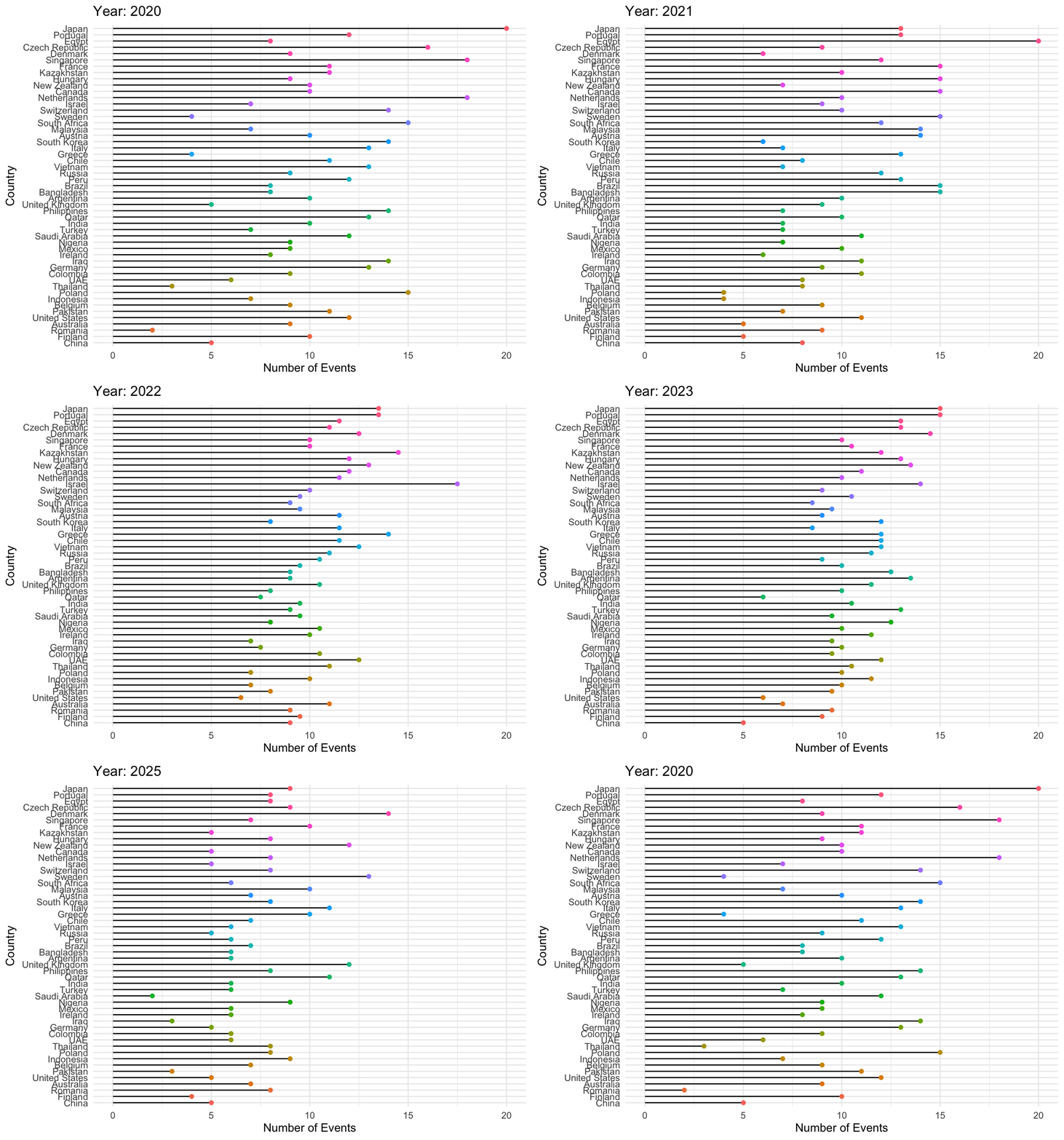
The good news is that the code above works to create an animation. The bad news is that it is not a very good animation. What should be improved?
Before moving on, look at the comments in the code above to learn what each line is doing.
Animate over country
Here we animate over the countries and display the number of storms per year for each country. The animation will transition from one country to the next. Remember, before you animate/iterate - get the code to work for one instance.
p_country <- events_per_country |>
  # we'll change this later
    ggplot(aes(x=year, y=n, group = country)) +
    geom_segment(aes(x=year, xend=year, y=0, yend=n)) +
      geom_point(aes(color=country),size=10) +
  theme_minimal() +
  theme(legend.position = "none") +
  transition_states(states=country,
                    transition_length = 1,
                    state_length = 5) +
  enter_fade() +
  exit_fade() +
  ease_aes('linear') +
  labs(title = "Country: {closest_state}",
       x = "Year", y = "Number of Events")

# slow the animation down: longer duration + lower fps = more seconds per frame
# below the 51 is the number of countries in the dataset.  The 3 is the number of seconds per country.

events_per_country |>
  count(country) |>
  nrow()
[1] 51animate(p_country, renderer = gifski_renderer(), duration = 51*6, detail = 2)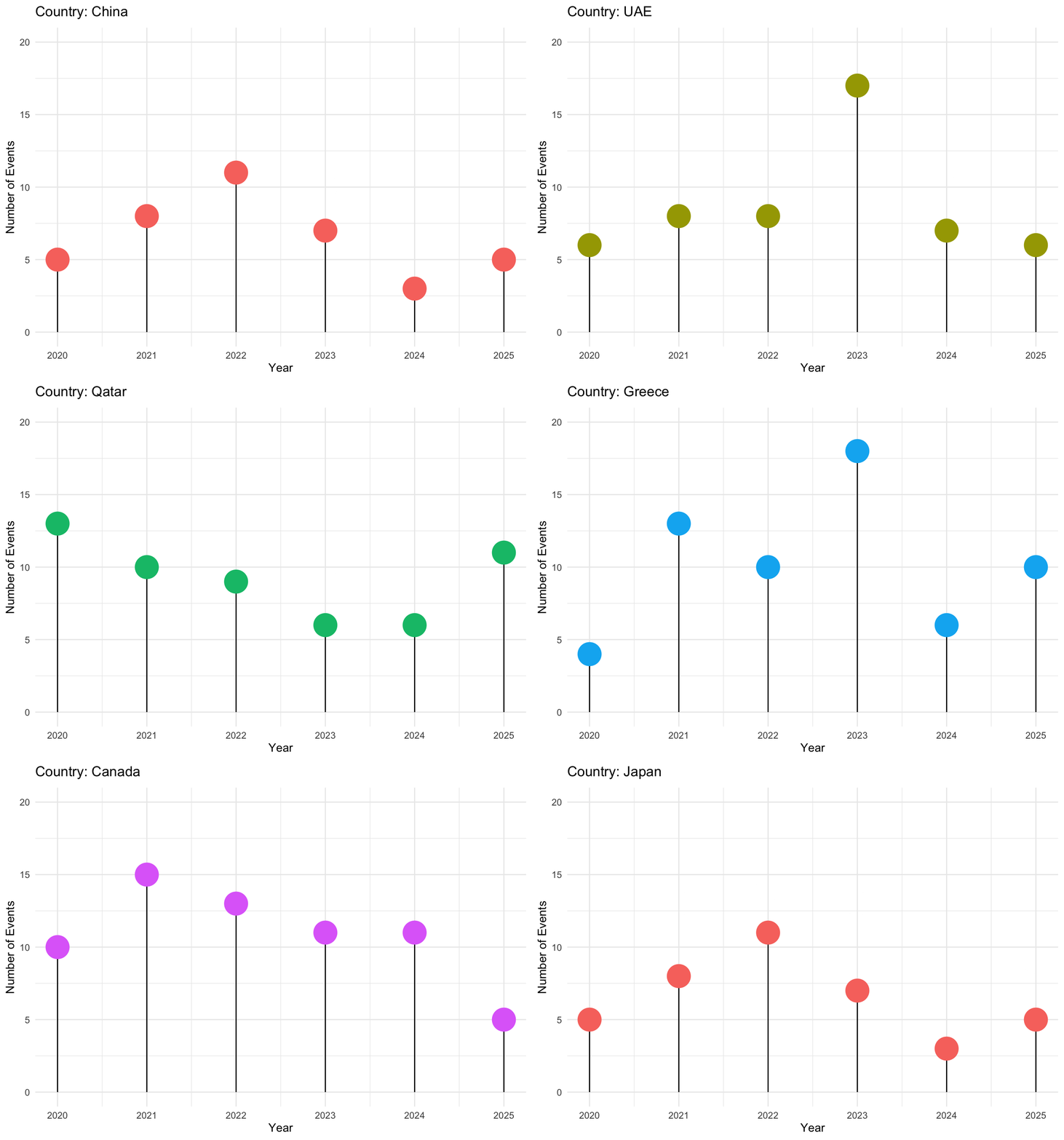
This plot is better, but still could be improved. Watch out for mistiming of the transition and state lengths. The transition length should be shorter than the state length. Also, the duration should be longer than the number of countries times the number of seconds per country.
Watch your animations and make sure {closest_state} is displaying the correct variable. If not, check your transition_states() call.
Animate over summary data
As we have noticed previously, plotting the raw data is not always the best approach. Let’s summarize the data and then animate over it.
# summarize the data by year and event_type, and get the maximum deaths for each group
gce_sum <- gce |>
  group_by(year,event_type) |>
  summarise(mx = max(deaths))

# event types vs. maximum deaths, animated over year
# assign a group to the data (frequently to keep lines connected) and also
# to ensure transition_states() works
p <- gce_sum |> ggplot(aes(x=event_type, y=mx, group = year)) +
    # lollipop jazz
    geom_segment(aes(x=event_type, xend=event_type, y=0, yend=mx)) +
    geom_point(aes(color=mx,size=mx)) +
  theme_minimal() +
  theme(legend.position = "none") +
  # notice size is mapped to the variable mx
  # below we control the rendered point-size range directly (in mm);
  # raise the upper bound to make the biggest points bigger
  scale_size(range = c(5, 40)) +
  # continuous greyscale: highest mx (within each animated frame) gets the darkest color
  # this data is about deaths, so use a color that reflects that
  scale_color_gradient(low = "grey85", high = "black") +
  # the actual animation part
  transition_states(states=year,
                    transition_length = 1,
                    state_length = 10) +
  enter_fade() +
  exit_fade() +
  ease_aes('linear') +
  labs(title = "Deadliest Climate Disasters: {closest_state}",
       x = NULL, y = "Deaths",
       caption = 'Source: Kaggle Global Climate Events and Economic Impact Dataset') +
  theme(
    axis.title = element_text(size = 16),
    axis.text = element_text(size = 12)) +
  # the dodge below is usually set to 2, but we coord_flip() so 1 is better
  scale_x_discrete(guide = guide_axis(n.dodge = 1)) +
  # swap the axes so the event types are on the y-axis and the deaths are on the x-axis
  coord_flip()
# count the number of years in the dataset to determine how long to make the animation
gce_sum |>
  count(year) |>
  nrow()
[1] 6# tips:
# 1. to slow it down: longer duration + lower fps = more seconds per frame
# 2. to speed it up: shorter duration + higher fps = fewer seconds per frame
# 3. ensure duration > number of transition_states * state_length
animate(p, renderer = gifski_renderer(), duration = 7*10, fps = 10)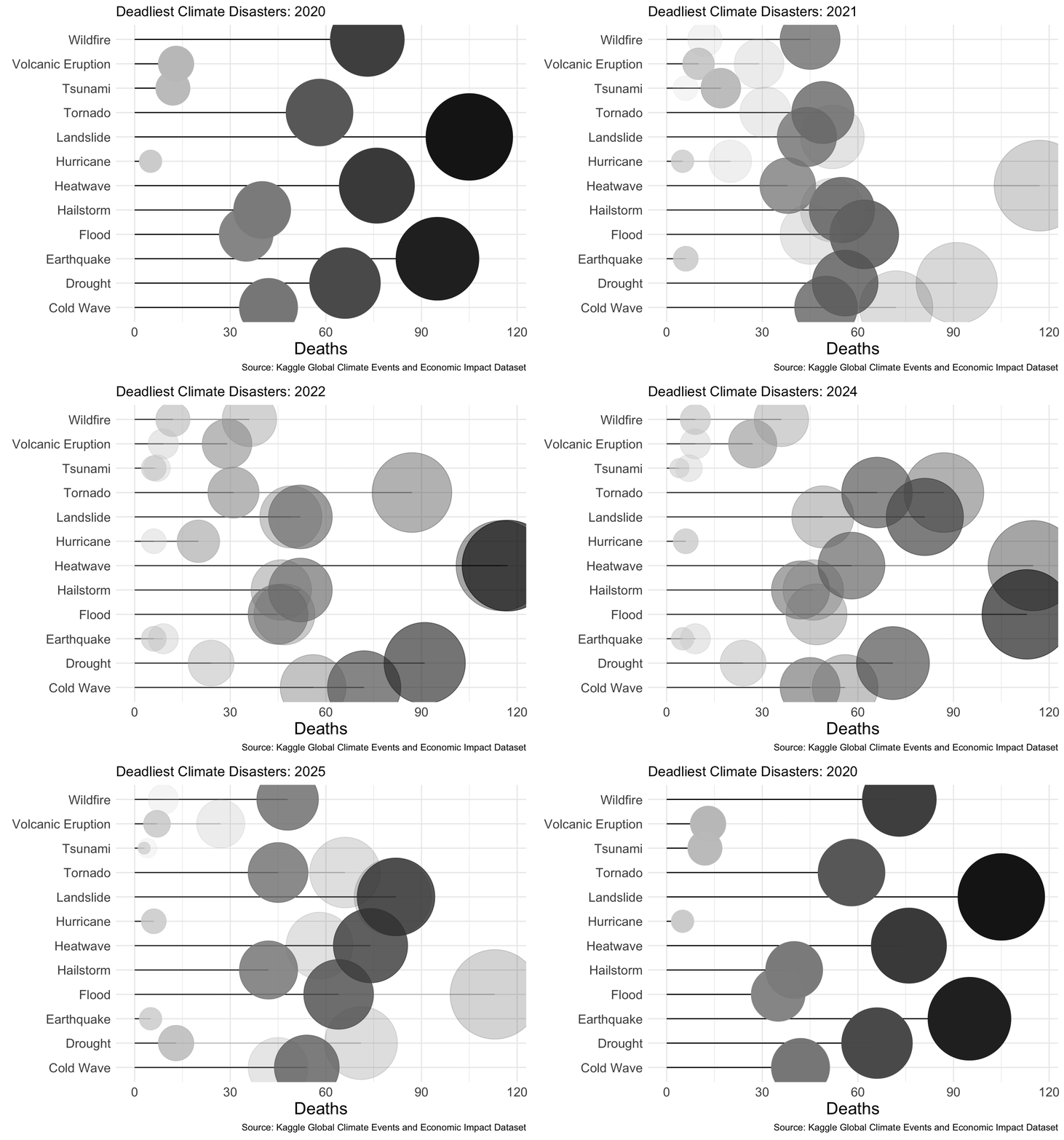
Limitations of this dataset
Class Exercise
Confirm that this dataset misses the deadliest floods of 2020-2024. Let this be a warning about putting great belief in data without checking validity.
Group & Graph Function
We may wish to animate over different variables. Let’s create a function that will allow us to do that.
# remember the function syntax: function_name <- function(arg1,arg2,arg3) { ... }
group_and_graph <- function(data, quantitative_var, group_var) {

# turn the quantitative_var column name into a readable label, e.g.
# economic_impact_million_usd -> "Economic Impact Million Usd"
label <- rlang::englue("{{quantitative_var}}") |>
  str_replace_all("_", " ") |>
  str_to_title()

sum_df <- data |>
  group_by(year,{{group_var}}) |>
  summarise(mx = max({{quantitative_var}}))

p <- sum_df |> ggplot(aes(x={{group_var}}, y=mx, group = {{group_var}})) +
    geom_segment(aes(x={{group_var}}, xend={{group_var}}, y=0, yend=mx)) +
      geom_point(aes(color=mx,size=mx)) +
  theme_minimal() +
  theme(legend.position = "none") +
  # controls the rendered point-size range directly (in mm);
  # raise the upper bound to make the biggest points bigger
  scale_size(range = c(5, 40)) +
  # continuous greyscale: highest mx (within each animated frame) gets the darkest color
  scale_color_gradient(low = "grey85", high = "black") +
  transition_states(states=year,
                    transition_length = 1,
                    state_length = 10) +
  enter_fade() +
  exit_fade() +
  ease_aes('linear') +
  labs(title = paste0("Climate Events with the Most ", label, ": {closest_state}"),
       x = NULL, y = paste("Maximum", label),
       caption = 'Source: Kaggle Global Climate Events and Economic Impact Dataset') +
  theme(
    axis.title = element_text(size = 16),
    axis.text = element_text(size = 12)) +
  scale_x_discrete(guide = guide_axis(n.dodge = 1)) +
  coord_flip()

# slow the animation down: longer duration + lower fps = more seconds per frame
animate(p, renderer = gifski_renderer(), duration = 30, fps = 1)
}

# Note: change the variable names below to animate over different variables.  For example, change `total_casualties` to `economic_impact_million_usd` or `affected_population`.  The group variable can also be changed to `country` or other categorical variables.
# The graph using total_causalities is dynamic
group_and_graph(gce, total_casualties, event_type)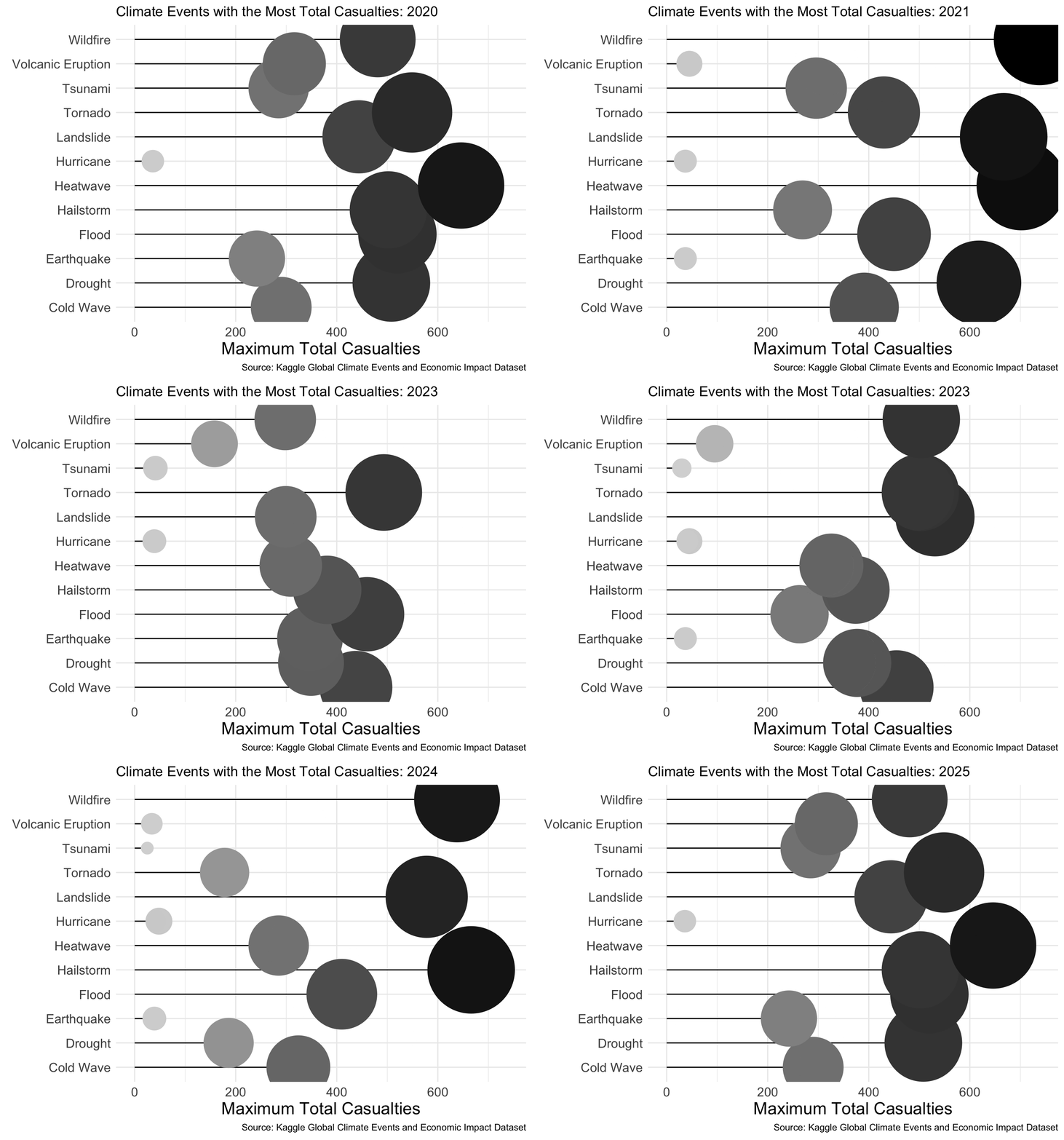
Class Exercise
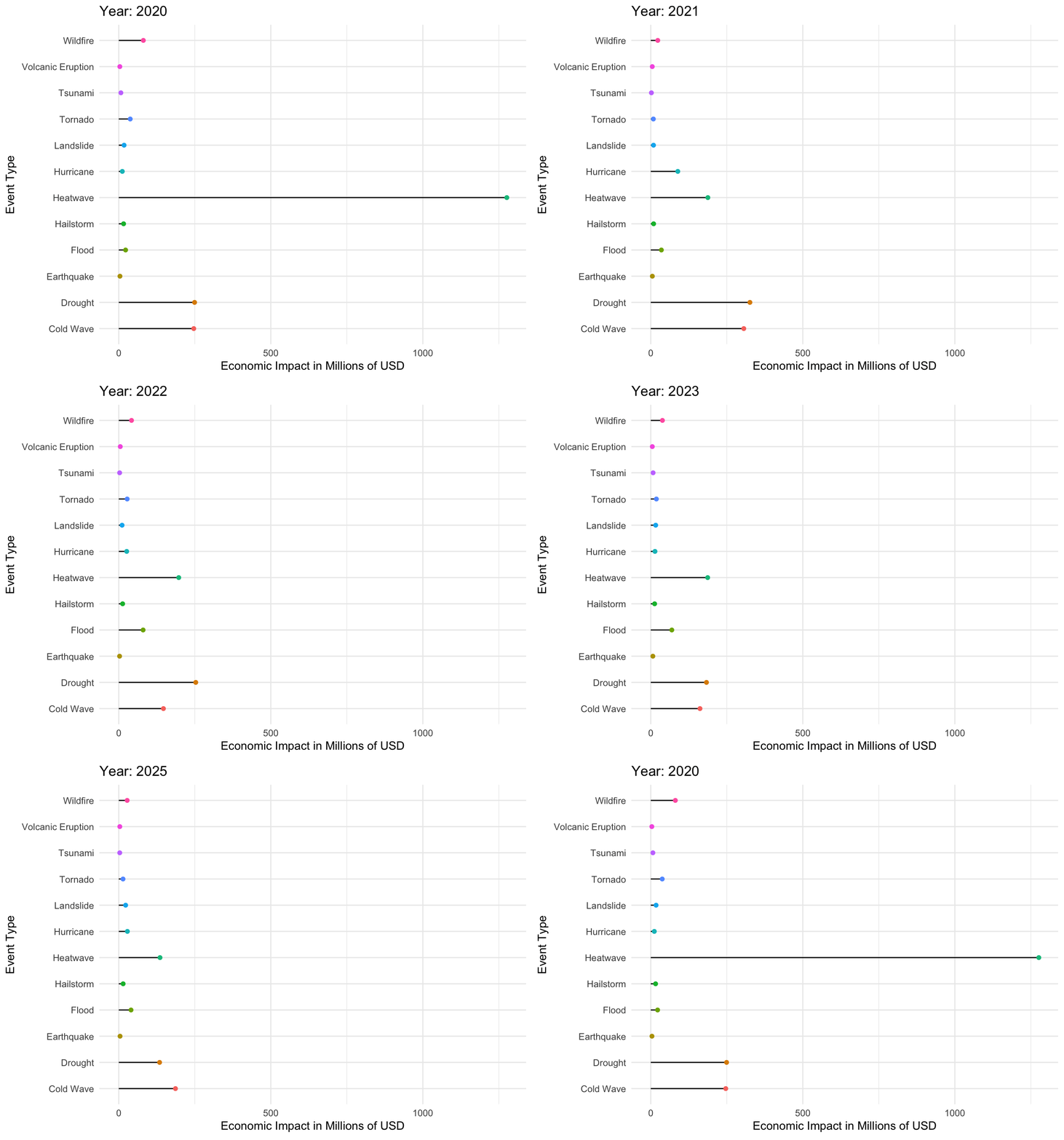
- Produce a similar animation, but consider economic impact, affected population or other variable.
Below is a simplified version of the code above.
economic_impact_per_event <- group_by(gce,event_type,year) |>
  summarize(
    econ = sum(economic_impact_million_usd)) |>
    mutate(event_type = reorder(event_type,econ))
p <- economic_impact_per_event |>
ggplot(aes(y = event_type, x = econ)) +
geom_segment(aes(x=0, xend=econ, y=event_type, yend=event_type)) +
geom_point(aes(color=event_type)) +
theme_minimal() +
theme(legend.position = "none") +
# the animation steps
transition_states(states=year, # year is a variable in data
) +
# transition_length = 1,
# state_length = 10) +
enter_fade() +
exit_fade() +
ease_aes('linear') +
labs(title = "Year: {closest_state}",
y = "Event Type", x = "Economic Impact in Millions of USD")
animate(p,
duration = 10, # 41 countries, 2 seconds each
fps = 5,
#nframes = [...or pick it here])
)
Using plotly to animate
dataset CO2
In R’s datasets:
Atmospheric concentrations of CO2 are expressed in parts per million (ppm) and reported in the preliminary 1997 SIO manometric mole fraction scale.
a <- datasets::co2

# before you move on notice the structure of the data in a, it's not tidyverse friendly

# tidy the data
co2_tib <- data.frame(matrix(co2, ncol = 12, byrow = TRUE)) %>%
  setNames(c('Jan','Feb','Mar','Apr','May','Jun','Jul','Aug',
             'Sep','Oct','Nov','Dec')) %>%
  mutate(year = as.character(1959:1997))

# pivot to make plotting easy
co2_long <- co2_tib |> pivot_longer(cols = !year, names_to ="month", values_to="level")
Use plotly
plot_ly() is plotly’s native charting function (as opposed to ggplotly(), which converts an existing ggplot). Its syntax has a few differences from ggplot2:
- Variables are mapped with a formula, using
~variable_name, rather than insideaes(). frameplays the role that it did ingganimate: it tells plotly which variable to step through to create the animation, automatically adding a slider and play button.typeandmodetogether determine the kind of trace drawn (e.g.type = 'scatter', mode = 'markers'for points,mode = 'lines'for lines).- Calls are chained with the pipe, and layout options (titles, axis labels, etc.) are set afterward with
layout(), rather than added with+as inggplot2.
library(plotly)

fig <- co2_long %>%
  plot_ly(
    x = ~month,
    y = ~level,
    frame = ~year,
    type = 'scatter',
    mode = 'markers',
    showlegend = F,
    size = ~level,
    sizes = c(10, 50)
  ) |>
  layout(title = "Atmospheric Concentration of CO2")

fig
Other forms of Interactivity
Unlike plot_ly(), ggplotly() doesn’t need its own special syntax: you build an ordinary ggplot2 plot with aes(), +, and geoms exactly as before, then wrap the finished plot object in ggplotly() to convert it into an interactive plotly widget. This adds hover tooltips, zooming, and panning for free, but the mapping and layout logic all still lives in the ggplot() call itself.
    library(plotly)

    p <- gce %>%
    ggplot( aes(
      x = affected_population,
      y = total_casualties,
      size = infrastructure_damage_score,
      color=event_type)) +
      scale_x_continuous(trans = "log") +
    geom_point() +
    theme_bw()

    ggplotly(p)
You can:
Zoom by selecting an area of interest
Hover the line to get exact time and value
Export to png
Slide axis
Double click to re-initialize.
3-D Plots
The package rgl is great for 3D plots. It creates a stand-alone window of your 3d plot.
# install.packages("rgl")
library(rgl)
# Data: the iris data is provided by R
data <- iris

# Add a new column with color
mycolors <- c('royalblue1', 'darkcyan', 'oldlace')
data <- mutate(data,color = mycolors[ as.numeric(Species) ])

# Plot
plot3d(
  x=data$`Sepal.Length`, y=data$`Sepal.Width`, z=data$`Petal.Length`,
  col = data$color,
  type = 's',
  radius = .1,
  xlab="Sepal Length", ylab="Sepal Width", zlab="Petal Length")
To display it in a Quarto/R Markdown document:
# To display in an R Markdown document:
rglwidget()
Exercise
Repeat the 3d plot above on the penguins data, or the gce data.