library(tidyverse)
# load housing data for each county
zil <- read_csv("../week9/zdata/County_zhvi_uc_sfrcondo_tier_0.33_0.67_sm_sa_month_2025.csv")

# clean names
zil <- janitor::clean_names(zil)Zillow Map
Coloring Counties with Data
Load Zillow Data
On the Zillow Data page, one can download ZHVI data for each county in the US. Run download_zillow_data.R once from this folder to set up a local zdata/ folder with that file, then import it below:
Next we use the pivoting script created previously to tidy the data
Pivot the data
# one could use rowwise(), c_across(), etc but this is nicer
#
# assumes you've copied load_clean_zillow.R into this folder too
source('../week8/load_clean_zillow.R')
# this creates a variable named value
zil_pivot <- clean_it(zil, 'value')

zil_pivot |> head()
# A tibble: 6 × 11
region_id size_rank region_name region_type state_name state metro
<dbl> <dbl> <chr> <chr> <chr> <chr> <chr>
1 3101 0 Los Angeles County county CA CA Los Angel…
2 3101 0 Los Angeles County county CA CA Los Angel…
3 3101 0 Los Angeles County county CA CA Los Angel…
4 3101 0 Los Angeles County county CA CA Los Angel…
5 3101 0 Los Angeles County county CA CA Los Angel…
6 3101 0 Los Angeles County county CA CA Los Angel…
# ℹ 4 more variables: state_code_fips <chr>, municipal_code_fips <chr>,
# date <date>, value <dbl>Create a county fips code
The plot_usmap() function requires the fips code for plotting. The alternative is to use lat/lon pairs together with geom_polygon().
The zillow data comes with a state fips code and a municipal fips code we glue together to define a county fips code.
# still need to make a county fips code
zil_pivot <- mutate(
  zil_pivot,
  fips = as.character(
    paste0(
      state_code_fips,
      municipal_code_fips)
  )) |> relocate(fips)
Join Zillow data with Fips data
The us_map() function creates a variable called geom used to plot a polygon representing each county.
Join the geometry data with the zillow data using the fips code.
library(usmap)
county_map_data = us_map(regions = 'counties')
cd <- inner_join(zil_pivot, county_map_data)
Find the mean home value for each county.
# summary
zil_p <- cd |>
    group_by(region_name, state_name, fips, geom) |>
    summarize(mean = mean(value, na.rm=TRUE)) |>
    arrange(-mean) |> ungroup()
Map
library(scales) # for the label_dollar below

# grab coordinates  of center of the counties
# my_spot <- arrange(zil_p, desc(mean)) |> slice_head()
my_spot <- filter(zil_p,
                  str_detect(region_name, "Marquette"),
                  str_detect(state_name,"MI"))

# the geometry object
g <- sf::st_centroid(my_spot$geom)

# extract those coordinates
XY <- attributes(g)$bbox

# data frame to hold the label info
df <- data.frame(
  x = XY[1],
  y = XY[2],
  label = "\u2764" # The Unicode character for a heart
)

plot_usmap(
  data = zil_p, # the joined data
  regions = "counties",
  values = "mean", # using the mean variable for fill color
  color = "grey90", linewidth = 0.0005) + # make the boundaries small
  labs(title = "Mean Housing Price") +
  # trans = 'log' plots the colors on a log scale
  # (good for large scale diffs)
  scale_fill_viridis_c(trans = "log",labels = label_dollar()) +
  # since the values = "mean" is really fill = "mean"
  labs(fill = "Mean Price") +
  # plot a red dot near the most expensive county
  geom_sf(data = my_spot,
    aes(geometry = g), # plot the first centroid
color = 'red', size = 2) 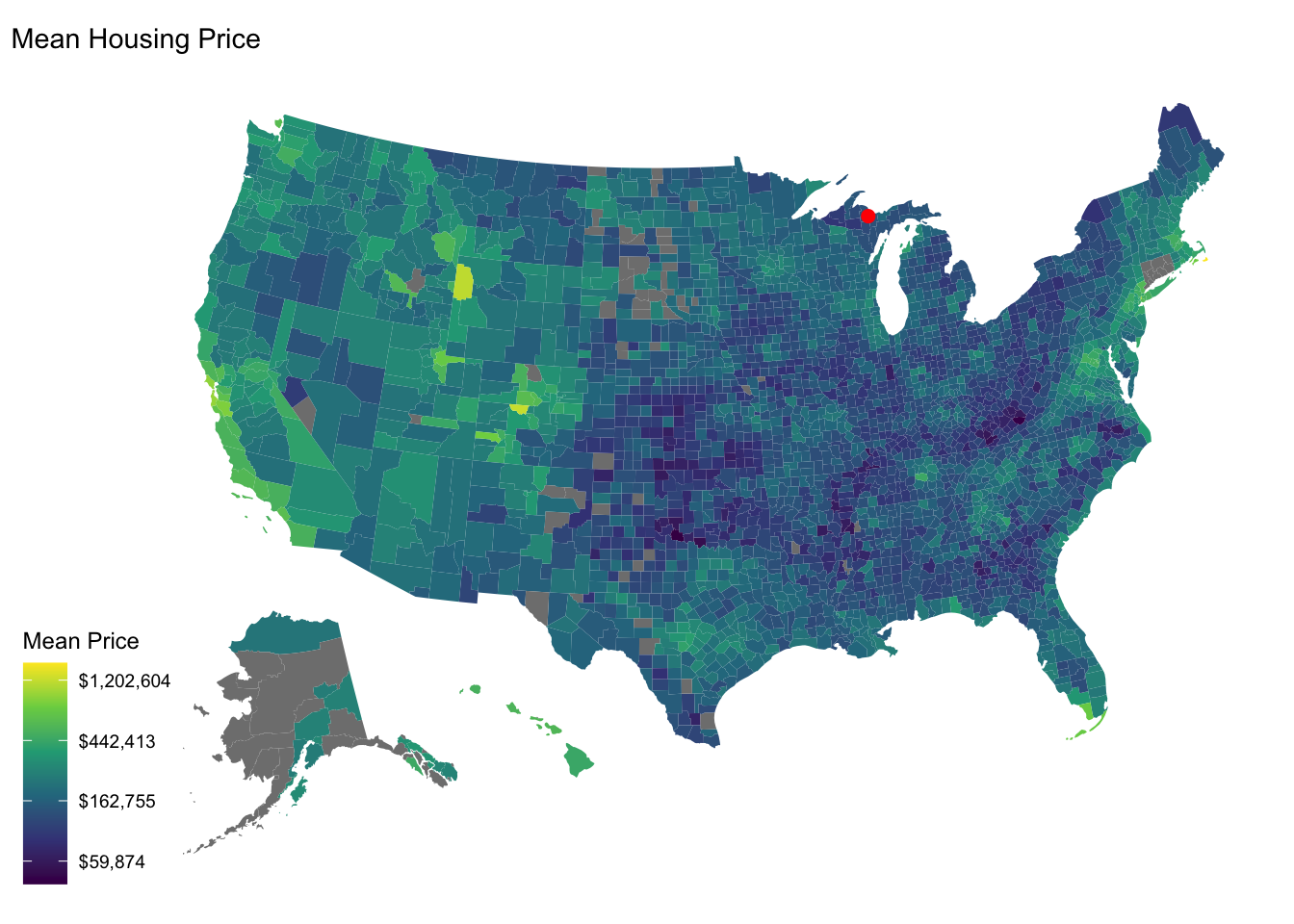
#  geom_point(data = df,
#             mapping = aes_string(x=x,y=y,shape=label),
#             color = 'red', size = 10)
  # geom_image(x=mlon,y=mlat,image="~/dat309/figs/housing.png", size = 5)